Practical online course design for non-designers
A practical guide to online course design for non-designers. Learn how to create effective workplace training using the knowledge you already have.
Designing online courses sounds straightforward until you start. You gather course content, outline a structure, and suddenly everything feels heavier than it should. And you’re not alone. 41% of employees say they don’t have time to learn because their job keeps them busy.
Most guides treat online course design like you’re building a university program. But most teams building workplace training aren’t instructional designers, and they don’t need to be. Online learning has to fit around real work.
This guide keeps things practical.
A clear, accessible way to design effective online courses using the knowledge your team already has. No academic jargon or months-long build. Just a workable approach you can use today.
If you need to design an online course quickly and make it useful, this is your starting point.
What is online course design?

Online course design is the process of turning everyday knowledge into clear, usable online courses that help people do their jobs with confidence. It’s practical, simple, and any team can do it.
At its core, it’s how you shape course content so people can learn quickly inside a busy online environment.
What it involves:
- Setting clear learning objectives that define the outcome
- Breaking information into short lessons that support the learning process
- Adding small learning activities to keep learners engaged
- Organizing content into a logical flow people can follow
- Supporting real tasks, real tools, and real work
What it avoids:
- Overcomplicated frameworks
- Weeks of planning or production
- Specialized roles or complex authoring tools
Modern platforms make the process even faster. AI-powered tools like Coassemble help teams organize and structure content automatically, so you can design an effective online course from the knowledge you already have.
Core principles of effective online course design
When your team knows what they’re aiming for, every part of the course design becomes easier to shape, refine, and deliver. These principles help you build effective online courses that actually support performance, not overwhelm people with information.
Start with clear learning outcomes
Before adding content, identify what your learners should be able to do.
Not remember. Not recognize. Do.
Strong learning outcomes keep the course focused and prevent extra noise from creeping in.
What to consider:
- What action should learners take after completing this course?
- What skill, task, or behavior should improve?
- How will you know the training worked?
Keep outcomes specific, measurable, and connected to real work.
For example:
- Instead of “understand customer service”
- Use “resolve common customer complaints using our three-step process.”
Clear outcomes shape everything that follows: your course structure, assessments, learning activities, and how you explain the content.
Structure content in digestible chunks
Short, focused lessons keep learners moving. Small pieces help people stay engaged, retain key ideas, and apply them faster for overall course effectiveness. Microlearning can boost knowledge retention by 25-60% compared to traditional longer formats.
Here’s what that looks like:
- Group related topics into tight, clear sections
- Turn dense text into short lessons with one purpose each
- Use short videos, visuals, or examples to reinforce basic concepts
- Keep each lesson easy to complete in a few minutes
A practical example:
Transform a 50-page policy document into five modules with three to five lessons each. Same knowledge, but easier to absorb and use at work.
Make it interactive, not just informational
Information alone rarely sticks. Interaction helps learners think, apply, and practice before they do the real thing.
Effective, lightweight interactions include:
- Quick quizzes to check understanding
- Short scenarios that mirror real tasks
- Decision points that prompt learners to choose an action
- Light case studies that show how the knowledge applies at work
Modern tools help here. Coassemble’s AI Create can suggest interactive moments automatically, turning plain text into activities that support real skill-building.
Design for real-world application
A course works when learners can use it immediately. Connect every lesson to actual workflows to help people move from knowing to doing.
Ways to anchor training in real work:
- Use examples pulled from real tasks
- Tie lessons to specific decisions or actions
- Explain the “why,” not just the steps
- Include scenarios that mirror common challenges
- Build assessments that test practical judgment, not memorization
When training matches real environments, learners apply it faster, and the learning experience makes a direct impact.
The practical course design process for busy teams
You don’t need months to design online courses that work. With the right approach, you can move from idea to launch in days, sometimes hours. This process keeps things simple, grounded in real work, and built around the knowledge your team already uses.
Audit your existing knowledge
Most teams already have the foundation for a great course. They just don’t realize it.
Your course content is scattered across tools and formats, sitting quietly in:
- Google Drive folders
- PDFs and policy docs
- PowerPoint slides
- SOPs, checklists, and handover notes
- Recorded demos or quick short videos
Start by gathering what you already have. Look for the knowledge people ask about most: onboarding steps, process updates, product training, compliance essentials, anything that supports daily tasks and promotes learner success.
You don’t need to build everything from scratch. The fastest way to start strong is to repurpose what already works.
If you’re assessing how your knowledge moves across the business, this overview of knowledge transfer tools can help you see what fits your workflow.
Define your audience and their needs
A course lands best when you know who you’re designing it for. Not through complex personas, just a clear picture of your learners and their day-to-day reality.
Think through:
- Who needs this training? (new hires, support teams, sales, operations)
- What’s their level of prior knowledge?
- What tasks do they struggle with today?
- What should they be able to do differently after completing the course?
This keeps your course design grounded in real needs, not assumptions.
Organize content into a logical flow
Once you know what to include, shape it into a clear path learners can follow.
A good course structure removes guesswork and helps people move through the learning process with confidence.
A simple way to organize content:
- Start with essential context or a quick welcome
- Move into core concepts and key tasks
- Add practice, scenarios, or decision points
- End with an assessment or recap to reinforce learning outcomes
Keep the flow building step by step. Ask yourself: What does someone need to know first? What naturally comes next?
Example flow for workplace training:
- Welcome & purpose
- Core concepts
- Real examples and application
- Scenarios or short activities
- Quick assessment
A logical flow keeps learners focused and helps your online course feel easy to complete.
Choose your delivery method
How your course is delivered matters as much as what’s inside it.
Most workplace training fits into three formats:
- Asynchronous (self-paced): Learners move through the course when they have time. Ideal for onboarding, product updates, and process training.
- Synchronous sessions: Live workshops or virtual walkthroughs for topics that benefit from real-time discussion.
- Blended: A mix of self-paced lessons with a short live touchpoint.
For busy teams, asynchronous training usually works best. According to McKinsey, 58% of employees prefer self-paced online training over traditional formats. It lets people learn without blocking calendars or slowing work.
And delivery doesn’t have to mean pushing people into a tool they rarely open.
Share training where your team already works: Slack, email, or connected systems. Modern tools also let you embed online courses into existing platforms without disrupting workflows.
Meet learners where they are, and the learning sticks.
Transform content into an engaging course
This step used to take weeks. Now you can create courses in minutes.
Modern tools speed up course development by handling structure and flow for you. Instead of building from scratch, you upload your instructional materials, and the platform shapes them into a ready-to-edit course shell.
What the process looks like:
- Upload a PDF, PowerPoint, or SOP
- The system organizes it into clear lessons
- Interactive moments and visuals are suggested automatically
- You refine tone, examples, and details
Upload your customer service handbook. Get a full course with modules, scenarios, and checkpoints already aligned to your learning outcomes.
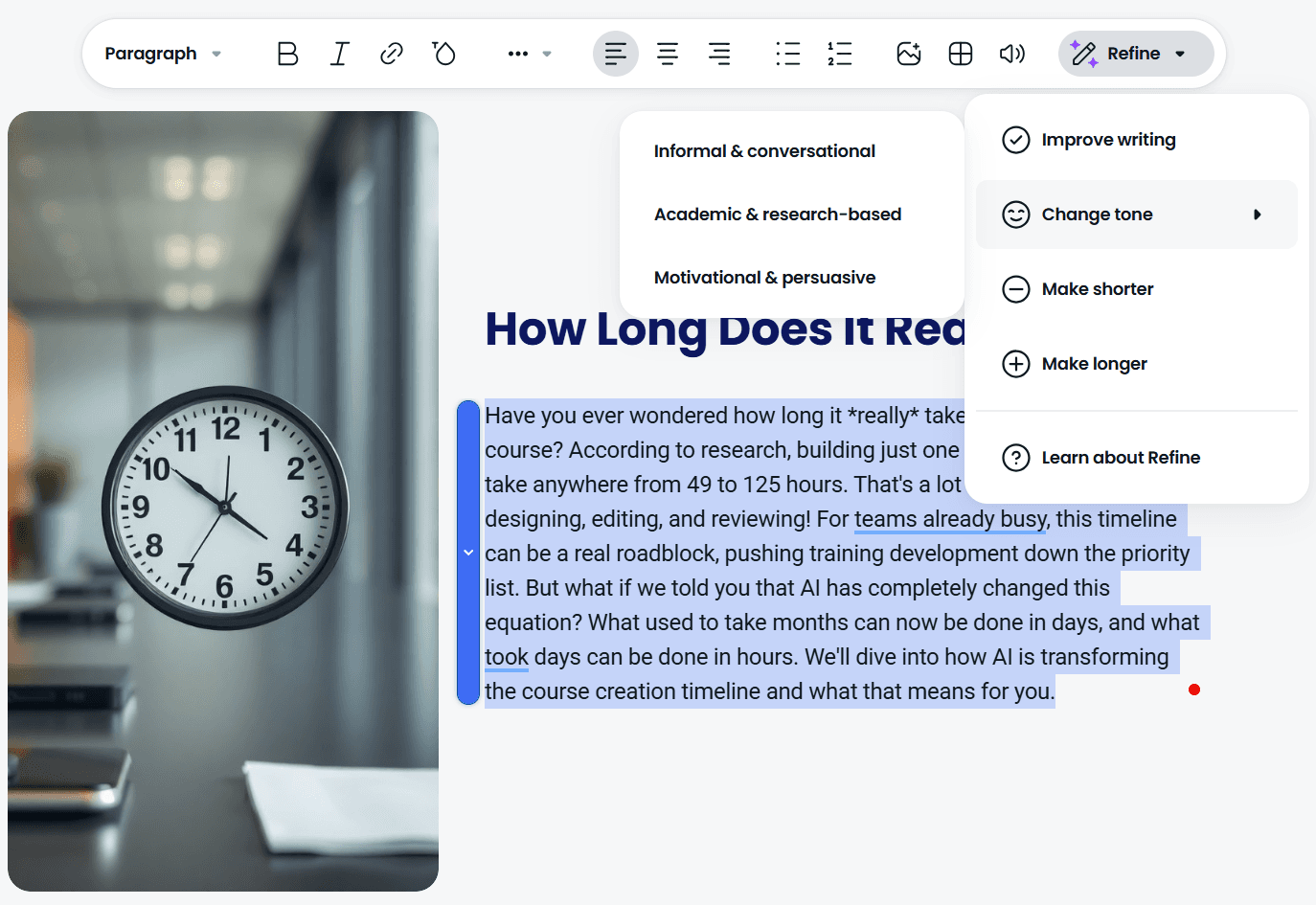
With tools like Coassemble, static files become interactive workplace training fast. No design skills. No bottlenecks. Just practical online course creation from the knowledge your team already uses.
Test and iterate
Once your course is live, treat it as a working draft, not a finished product.
A quick test with a small group can reveal what’s clear, what’s missing, and what needs adjusting. Look at completion patterns, quiz results, and simple feedback to see how the learning experience lands.
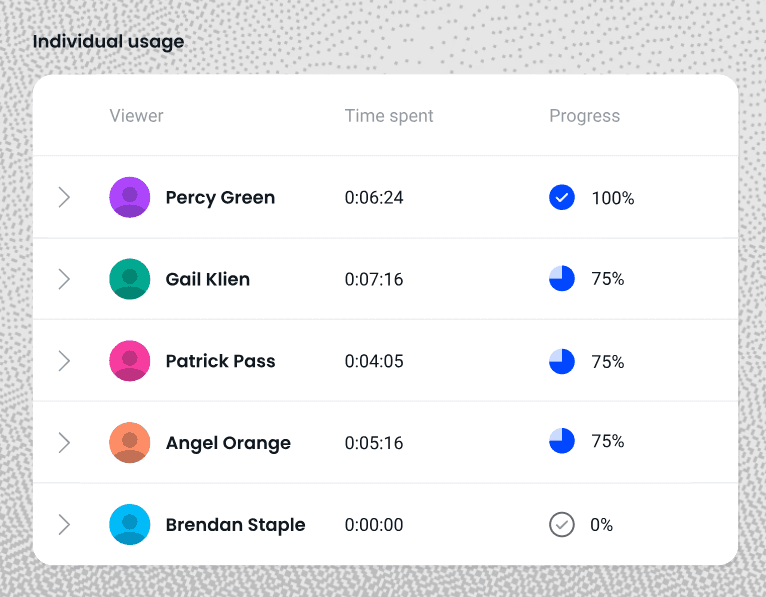
What to focus on:
- Are learners completing lessons without confusion?
- Do the activities support your learning outcomes?
- Which parts slow people down or get skipped entirely?
- What needs updating as processes change?
Small improvements go a long way.
Modern tools make edits instant, so your training stays accurate, useful, and aligned to real work.
Common online course design mistakes (and how to avoid them)
Even well-intentioned training can miss the mark. These are the mistakes that slow learners down and how to avoid them as you build better online courses for your team.
Making courses too long or complex
Long lessons drain attention fast. When a course feels heavy, learners skim, stall, or step away, and the learning experience loses impact.
How to avoid this:
- Keep lessons short and focused
- Break big topics into smaller, actionable steps
- Aim for 5-10 minute segments that support your learning outcomes
Clarity beats length. When content is easy to follow, learners stay engaged and the course does its job.
Using inaccessible tools
Some tools slow everything down. When only one person can edit or publish a course, updates pile up, and knowledge gets stuck.
A better approach:
- Choose tools anyone on your team can contribute to
- Avoid platforms that require specialist training
- Use systems that make quick edits simple as processes evolve
Accessible tools remove friction and keep your online course design moving at the pace of your business.
Treating course design as a one-time event
When workplace processes shift, static training falls out of date just as quickly. A course isn’t something you publish once and forget. It’s something you refine.
How to keep it current:
- Review lessons regularly
- Update workflows, screenshots, and examples as they change
- Use tools that let you adjust content instantly
Iteration keeps your online courses useful and aligned with how your team actually works.
Ignoring where people actually work
Even the best training falls flat if learners can’t find it. When courses live in tools people rarely open, completion drops, and so does impact.
How to avoid this:
- Share courses in places your team already uses, like Slack or your LMS
- Embed training into everyday tools
- Keep access simple, direct, and friction-free
Meet learners where they are, and your training becomes part of the workflow, not another task on their list.
Wrapping Up
Designing online courses doesn’t need to be slow or complicated.
When you focus on clear outcomes, simple structure, and real-world application, training becomes something your team can actually use, without long build times or specialist tools.
Most of the knowledge you need is already inside your organization. Modern platforms help you turn it into a practical learning experience quickly, so learners stay focused and progress with confidence.
With Coassemble, you can take what your team knows today and shape it into training that’s ready to share the same day: knowledge in motion, not trapped in files.
FAQs about online course design
What is online course design?
It’s the process of structuring workplace knowledge into clear, engaging online courses that help learners build skills and apply them on the job.
What are the key principles of online course design?
Set clear learning outcomes, break content into digestible chunks, add simple interactions, and connect every lesson to real work.
How long does it take to design an online course?
With the right tools, you can design a practical, ready-to-share course in hours, especially when starting from existing materials.
Do I need instructional design experience to create online courses?
No. Modern tools guide structure and flow so any team can create effective training without specialist experience.
What’s the difference between instructional design and course design?
Instructional design is a formal discipline. Course design is the practical process teams use to turn daily knowledge into useful, real-world training.
Keep reading
Headless Authoring Tools: The Ultimate Guide to Embedded Learning
Most training tools force a choice: adopt a rigid platform, or bolt on tools that never fit your product. Headless authoring is the third option. This guide covers what headless authoring is, how it works, and why it matters when you're building learning into a product instead of deploying it as a standalone tool.
What is microlearning? And why your team should be using it
Microlearning breaks training into short, focused lessons that actually stick. Here's what it is, why it works, and how to use it.
What are the top AI platforms for converting documents into courses?
Tools like Coassemble show what happens when document conversion is built for real workflows. Knowledge moves from files into courses, without forcing teams to replace their existing LMS or processes.