Headless Authoring Tools: The Ultimate Guide to Embedded Learning
Most training tools force a choice: adopt a rigid platform, or bolt on tools that never fit your product. Headless authoring is the third option. This guide covers what headless authoring is, how it works, and why it matters when you're building learning into a product instead of deploying it as a standalone tool.
Most training tools force a choice. Adopt a rigid platform built for someone else's workflow, or bolt together tools that never quite fit your product.
Headless authoring exists because neither option works for teams building software. When your product already has its own login and its own users, sending people to a separate portal breaks the experience you built.
This guide covers headless authoring from the ground up: what it means, how it works, and why it matters when you're building learning into a product instead of deploying it as a standalone tool. It also sets up the next question most teams ask: what does embedded learning actually look like in practice?
What is headless authoring?
Headless authoring is a way of creating and managing learning content without being tied to a specific front-end interface. The content layer and the presentation layer are separated, so a team can build training in the backend and display it anywhere they choose.
This differs from a traditional course creation tool, where content is locked to one fixed interface.
The term borrows from headless CMS, where the "head" and "body" are split apart:
- Head: the presentation layer — whatever interface learners actually see and use
- Body: the content management system — where the training content lives and gets built
Decoupling the two means a platform's team decides where content shows up, rather than being stuck with whatever interface came bundled with the tool. This separation also has a security benefit: isolating the front end from the backend creates a clear boundary between them. A vulnerability targeting the front end doesn't automatically expose the backend systems behind it.
This shift isn't isolated to training content. Gartner projects that by 2026, at least 70% of organizations will require composable digital experience platforms over monolithic suites — up from 50% in 2023.
You'll sometimes see this called a headless learning system. It's the same idea applied specifically to training content:
- An API-first backend that any front end can pull from
- No fixed learner interface bundled with the tool
- Content and delivery managed and scaled independently of each other
Headless authoring vs. embedded learning
Headless authoring and embedded learning are related, but they aren't the same thing. Getting this distinction right matters if you're trying to explain the concept to your own team or evaluate a vendor.
Headless authoring is the backend concept. It describes how content is built and stored, decoupled from any single interface. It's an architecture decision.
Embedded learning is the outcome. It's what a learner actually experiences when that headless content gets pulled into your product, your internal wiki, or your customer portal — instead of a separate platform they have to log into.
Put simply:
- Headless authoring is the API and backend that makes content portable
- Embedded learning is training that shows up inside a product a person already uses
You can have headless authoring without a fully embedded experience — if a team only uses the API to export content elsewhere. But you can't build genuinely embedded learning without a headless foundation underneath it. The API is what makes the embedded experience possible in the first place.
For a closer look at what embedded learning looks like in practice, including where it fits inside an existing LMS, see how embedded eLearning works in an LMS.
How headless authoring tools work
That API is doing more work than it looks like. Here's the mechanism behind it.
A developer connects to the backend through the API, then decides where content shows up. That could be a course player embedded in a custom web app, a widget inside an internal portal, or a component inside a customer-facing product. The backend doesn't care what the front end looks like — it just serves content to whatever's calling it.
This connection work is what people mean by headless development: building against an API-first backend instead of a bundled, fixed interface. The developer does this setup once per integration.
This doesn't make the tool developer-only. Most headless platforms also give content creators a usable interface, so subject matter experts can build and update training without touching code. The developer builds the pipe. Non-technical team members put content through it.
In practice, this usually looks like:
- The developer connects the API to a chosen front end
- Content creators build and update training through a separate interface
- The backend handles storage, structure, and delivery regardless of where content appears
For teams that want to see this working end to end, Coassemble's developer documentation covers the API, webhooks, and available integrations in detail.
Key benefits of headless authoring tools
That mechanism pays off in a few concrete ways once it's in place.
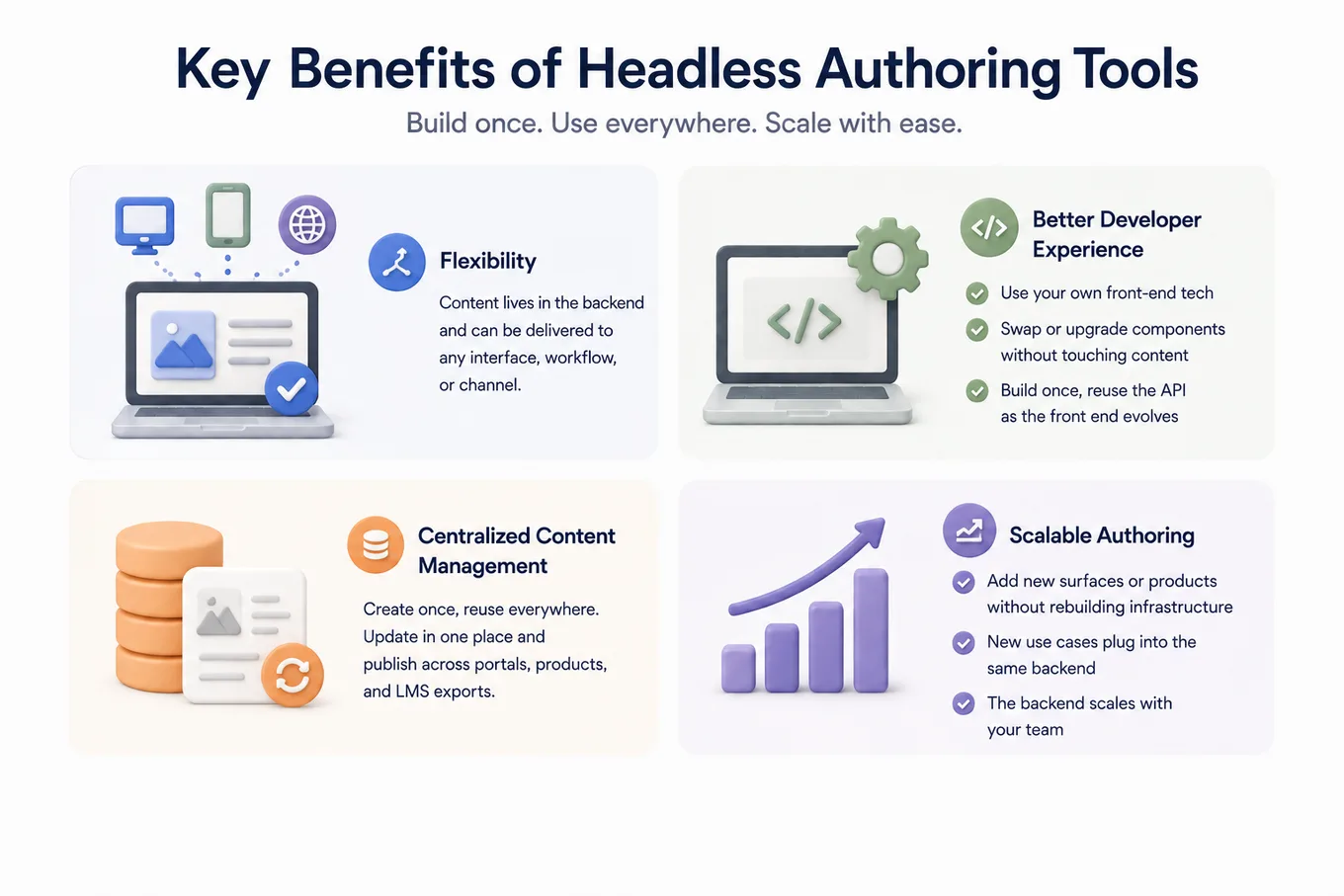
The clearest benefit is flexibility. A team isn't locked into one interface, one workflow, or one vendor's idea of what content creation should look like. Content lives in the backend and gets rendered wherever it's needed.
This also improves the developer experience:
- Developers choose their own front-end technologies, rather than being tied to a fixed presentation layer
- Components can be swapped or upgraded without rebuilding the content layer underneath them
- The API is built once per integration, then reused as the front end evolves
Centralized content management is another advantage. Content built once can be reused across surfaces instead of duplicated for each one. A team managing training for an internal portal, a customer product, and an LMS export can update it in one place rather than three.
This is also what makes the approach genuinely scalable. Because content isn't tied to a single interface:
- A growing team can add new surfaces or products without rebuilding training infrastructure each time
- New use cases plug into the same backend instead of requiring a separate system
- The backend scales with the team, not against it
If you're weighing this against a traditional setup, AI-powered training vs. a traditional LMS breaks down the tradeoffs in more depth.
Use cases for headless authoring tools
That scalability shows up differently depending on who's building with it. A few patterns come up again and again.
SaaS and technology platforms
Product teams use headless authoring to build onboarding, product training, and help content directly into their own software interface. It feels native to the product, because it is — rather than sitting in a separate tool bolted on afterward.
Customer training and support
Businesses training large external audiences, such as software vendors or equipment manufacturers, use headless authoring to embed training resources directly inside their own applications or customer portals. The training experience matches the product experience, with no separate login standing between the two.
People tech platforms
HR and people tech platforms use headless authoring to build onboarding, compliance training, and professional development directly into their existing product. They don't have to build authoring capability from scratch, and their training still looks like a native part of the software their customers already use.
What else can you build?
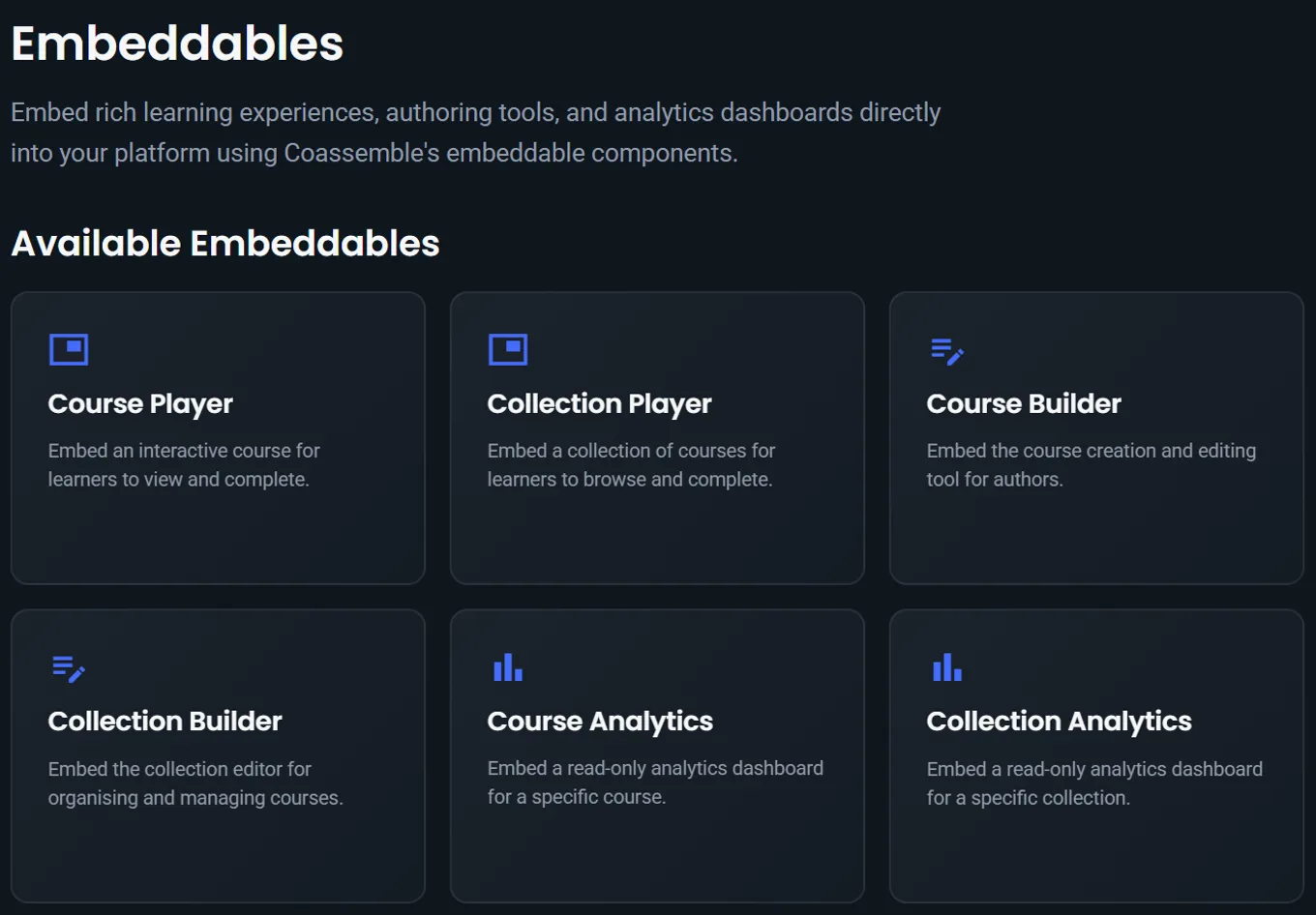
Authoring is only one piece of what a headless platform can do. Think of it less like one tool and more like a box of Lego: individual pieces you can snap in as needed, not a single fixed structure.
A headless platform can also power:
- The course player, so learners take training inside your product's interface, not a separate one
- Collections, for grouping courses into curated learning paths as a single package
- Delivery — sharing a course by link, embedding it with a signed URL, exporting it to an LMS via SCORM, or wiring it into tools your team already uses, all through the courses API
- Analytics, with course, collection, and user-level dashboards embedded directly into your own product
Each piece connects through the API on its own. A team can start with just the authoring layer, then snap in the player, delivery, or analytics later, without rebuilding anything already in place.
This is the difference between a single tool and a foundation. Coassemble's embeddable components are built around this idea: every piece, from authoring to delivery, is available as a component you can build into your own product.
Summary
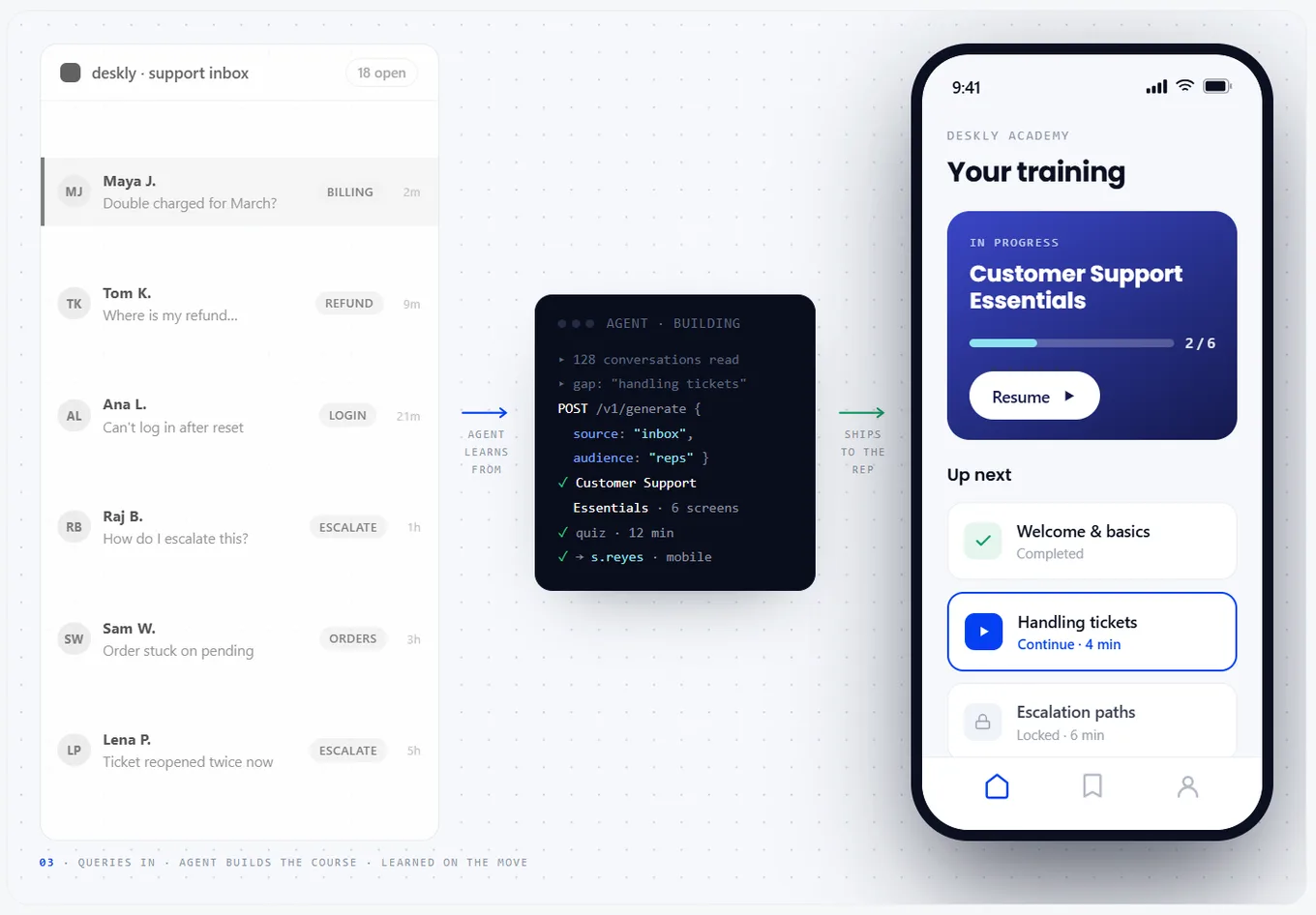
Headless authoring is the foundation. Embedded learning is what people actually experience because of it. Once you separate content from a fixed interface, training stops being a tool people have to leave their work for and becomes part of the product they're already using.
That foundation extends past authoring. The same API that powers content creation can also power the player, collections, delivery, and analytics — each one a component rather than a bundled feature you're stuck with.
If you're building software and training keeps getting bolted on as an afterthought, it's worth asking what that training could look like as a native part of your product instead.
Request access to Coassemble's sandbox → Free, no card required, and set up around what you're actually building.
FAQs: headless authoring tools
What is headless authoring?
Headless authoring separates content creation from the interface, so a team builds training in the backend and displays it anywhere. It's decoupled from any single fixed platform.
What does "headless" mean in development?
In development, "headless" means building against an API-first backend with no bundled interface. The developer connects the API to any front end they choose.
What's the difference between headless authoring and embedded learning?
Headless authoring is the backend architecture. Embedded learning is the outcome: training that shows up inside a product someone already uses, instead of a separate platform.
Is Coassemble Embed a headless learning system?
Yes. Coassemble Embed provides an API-first backend and embeddable components, so training can be built into your own product rather than a separate tool.
What are best practices for headless CMS content authoring workflows?
Separate authoring from delivery, connect the API once per integration, and give content creators a usable interface so non-developers can build and update training.
Keep reading
What is microlearning? And why your team should be using it
Microlearning breaks training into short, focused lessons that actually stick. Here's what it is, why it works, and how to use it.
What are the top AI platforms for converting documents into courses?
Tools like Coassemble show what happens when document conversion is built for real workflows. Knowledge moves from files into courses, without forcing teams to replace their existing LMS or processes.
AI course creator: how to use ChatGPT free for employee training
ChatGPT works as a free AI assistant for generating ideas and content, but it's not a full course creator. Bringing Coassemble into the mix will take your course creation to the next level.