How do you build product training for a SaaS team?
Product training that moves as fast as your product does. Here's how fast-moving SaaS teams turn existing decks and docs into structured lessons, share them in Slack, and track who's actually ready — no LMS or dedicated L&D team required.
According to Deloitte, poor knowledge transfer costs companies $5,500 per employee each year in wasted time. In fast-moving SaaS companies, that cost compounds with every sprint cycle.
This guide is for CS leads, sales enablement managers, and product managers who’ve been handed the problem and need to fix it fast without weeks of runway or a dedicated L&D team.
Here’s how to build product training that moves as fast as your product does, lives where your team already works, and actually gets used.
The two types of software as a service (SaaS) product training
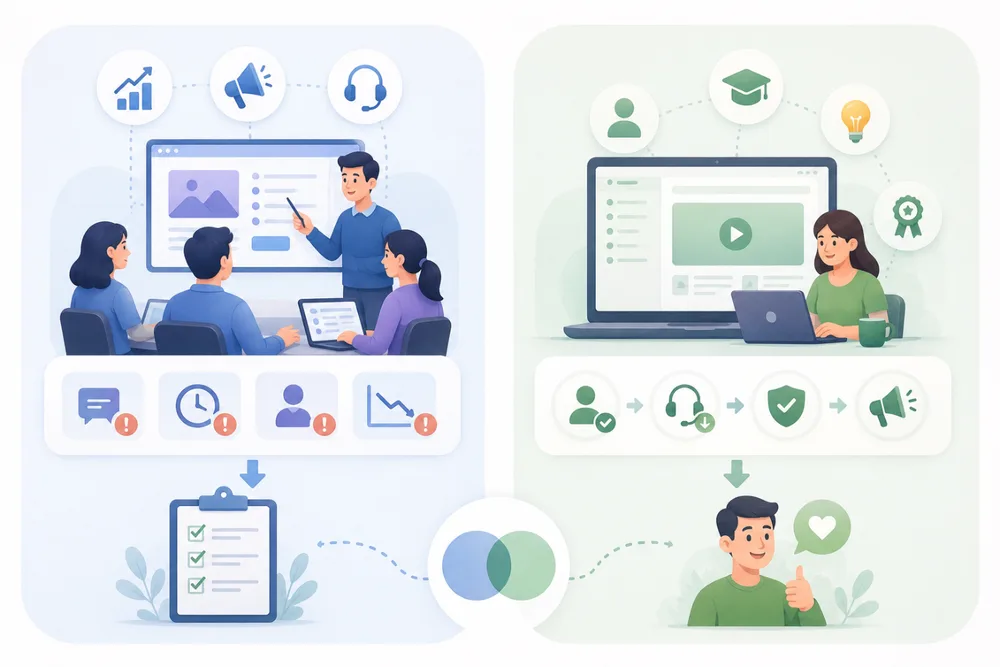
Before building anything, it helps to know which problem you’re actually solving because not all product training serves the same purpose.
1. Internal product training
Internal product training is about getting your own team aligned. Think:
- Sales demoing new features confidently
- Customer success teams absorbing product updates before they hit the queue
- Support knowing what changed and why
When this breaks down, the symptoms show up fast. Inconsistent messaging, missed objections, slower user adoption, and customer satisfaction scores that quietly erode.
It’s also the type most often deprioritized. It gets assumed to be L&D’s job, handed off to instructor-led training that never gets scheduled, or handled with a Slack message and a hope. Neither works at the pace SaaS companies ship.
2. Customer-facing product training
Customer-facing product training helps your users get value from the product faster. Done well, it:
- Drives user onboarding
- Reduces support volume
- Supports customer retention
- Turns new users into confident ones, and confident users into advocates
This piece focuses on internal product training. But the two overlap more than most teams realize.
What SaaS product training actually needs to look like
Most internal product training fails before it starts. A deck gets shared. A Slack message goes out. A 45-minute all-hands gets scheduled. And two weeks later, half the team is still fuzzy on the feature.
The problem is format, not effort. Here is what effective SaaS product training actually requires.
It needs to move as fast as your product does
SaaS applications do not stand still. Software development cycles move fast. Traditional long-form training buckles under that pace. By the time something is built, reviewed, and distributed, the product has already moved on.
The solution is not a longer course. It is smaller, modular, task-level content that is fast to update. Think one lesson per feature, not one program per quarter. According to the Stack Overflow Developer Survey, 62% of developers spend over 30 minutes each day looking for answers to poorly documented issues. In fast-moving SaaS companies, that is not a documentation problem. It is a training architecture problem.
It needs to live where your team works
Most SaaS teams do not log into a training platform. They live in Slack. Product training that requires a separate login, a course library, or a formal completion workflow will get ignored.
The most effective approach embeds knowledge directly into the tools where work already happens, not a separate platform. That means turning a release note or feature deck into a structured, trackable resource and pushing it into the Slack channel where the team already operates.
For a deeper look at how this connects to broader knowledge sharing practices, it is worth understanding how tacit and explicit knowledge flow differently across teams.
It needs to be created by the people who actually know the product
The bottleneck in most SaaS product training is not content. It is the creation process. The knowledge already exists:
- Product managers know the feature inside out
- Customer success teams know what customers struggle with
- Sales teams know the objections that keep coming up
But turning that knowledge into something structured and shareable has historically required tools, skills, or teams that they do not have access to.
A good knowledge transfer strategy solves this by making creation lightweight enough that the people who hold the knowledge can do it themselves. That is exactly what Coassemble is built for. Upload an existing deck or doc, use AI Create to structure it into a trackable, interactive lesson, and share it in Slack in minutes. No designer. No L&D team. No waiting.
How to build a SaaS product training your team will actually use
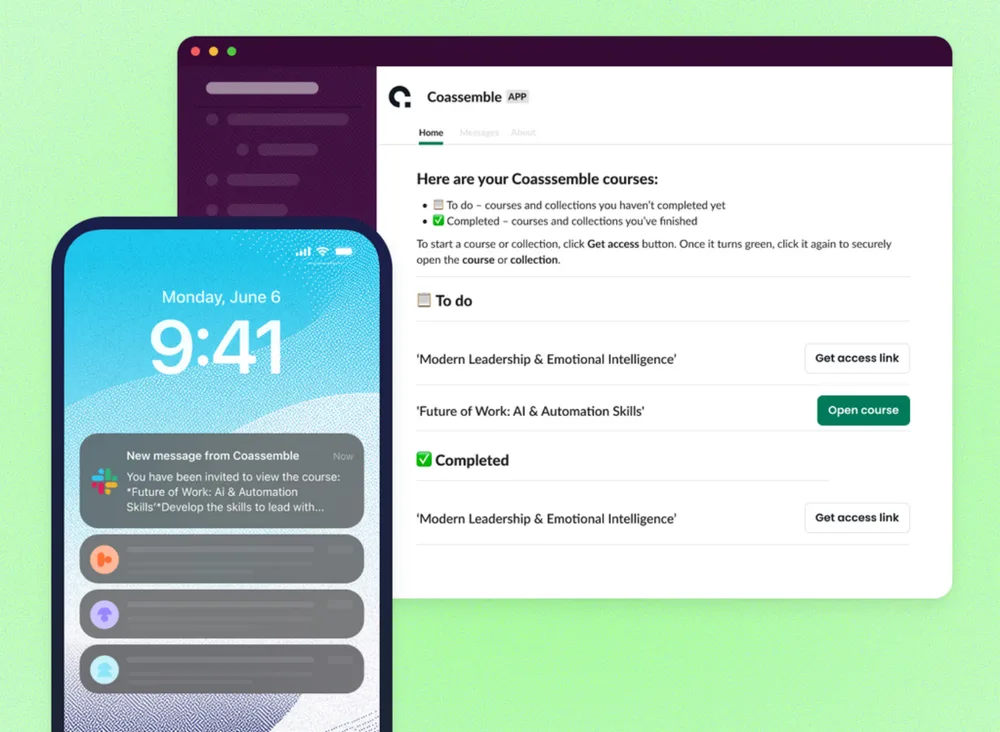
Most SaaS solutions ship updates faster than teams can absorb them. This is not about standing up a formal training program. It is about identifying what is broken right now and fixing it fast. Here is the approach.
Start with a specific knowledge gap, not a program
Do not try to train on everything at once. That is how you end up with a 40-slide deck nobody finishes.
Instead, identify the one thing causing friction right now. Ask:
- Which feature is your CS team still getting questions about after launch?
- What objection keeps tripping up your sales reps on calls?
- Where are new hires still going to Slack to ask questions that should already be answered?
The fastest way for reps to gain practical experience is to train on the exact friction point they’re hitting right now.
Turn existing materials into structured SaaS training
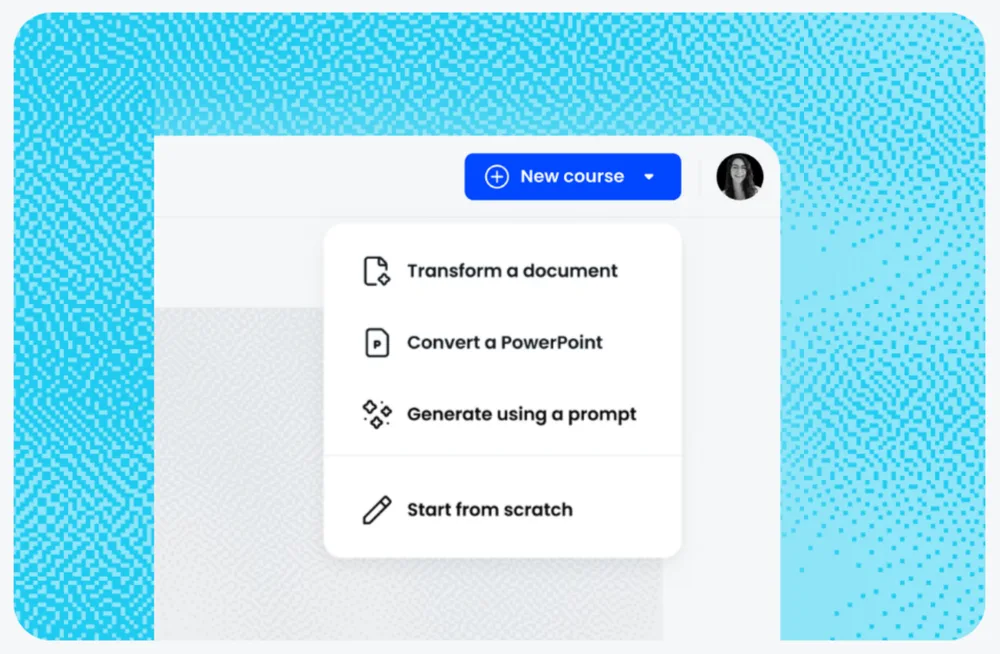
The content and technical documentation already exist. The goal is to transform them, not recreate them from scratch.
This is where the Transform vs. Convert distinction matters. When you bring content into Coassemble, you have two options:
- Transform restructures your content for online learning. It adds better pacing, interactive elements, and quiz reinforcement. This is always the recommended approach. It turns a static document into something people actually engage with.
- Convert imports your content word-for-word. What you put in is what you get out.
For SaaS product training specifically, Transform is almost always the right call. A feature release note converted verbatim is not training. A transformed lesson that explains the feature, shows the workflow, and checks comprehension.
Distribute inside Slack
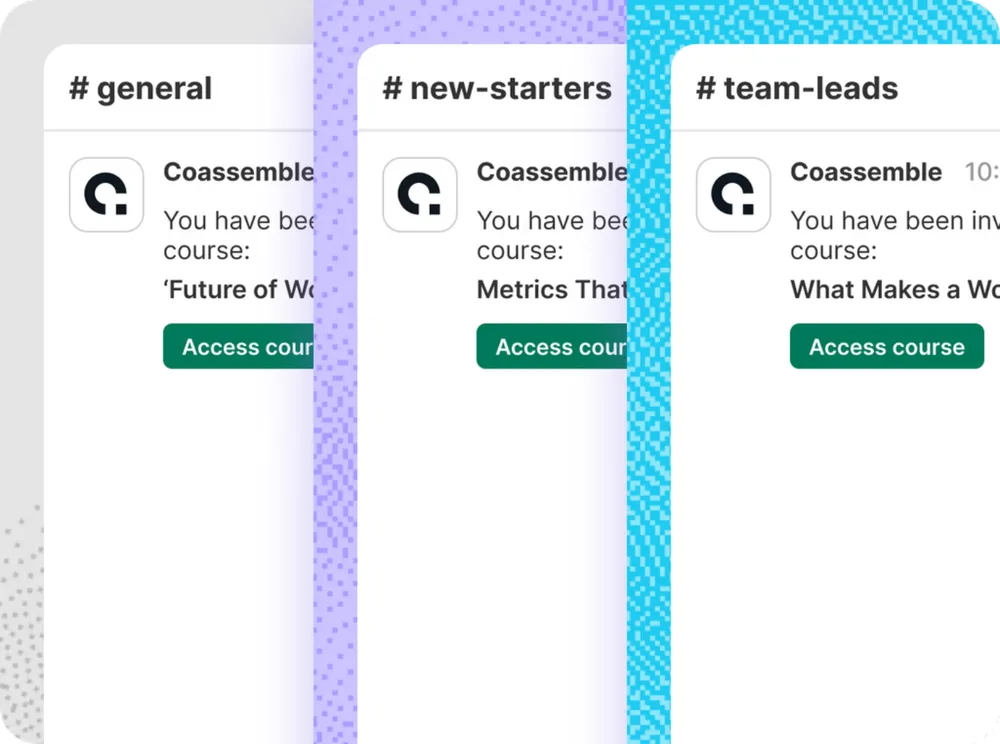
Once the resource is ready, do not send an email with a link buried in a paragraph. Drop it directly into the channel where the relevant team already operates.
- New feature for the CS team? Post it in #customer-success before the next sprint ships.
- Sales objection training? Drop it in #sales-enablement with a one-line context note.
- Onboarding update? Pin it in #new-hires so it is always findable.
Slack distribution is available on every Coassemble plan, including the free tier. So there is no reason to wait on budget approval to start getting knowledge where it needs to go.
Knowledge that lives where work happens gets used. Knowledge that lives somewhere else gets ignored. Slack is the difference between training that lands and training that sits. For teams thinking about how to structure sales training formats more broadly, this distribution principle applies across the board.
Track who has actually absorbed it
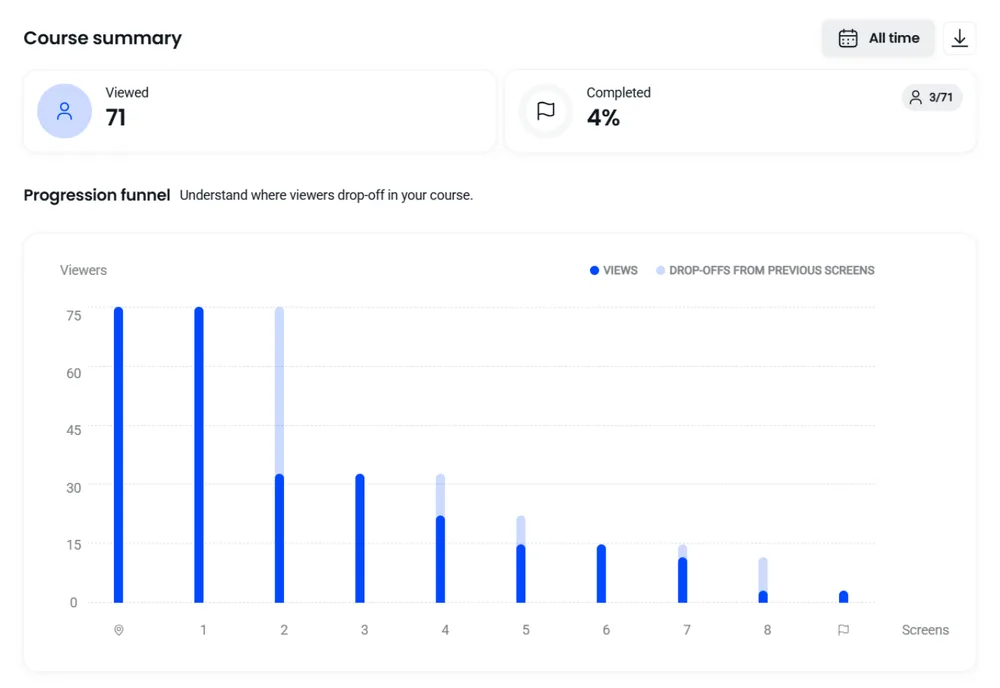
One of the biggest gaps in informal product training is the absence of any signal that it landed. A Slack message gets a few emoji reactions and disappears into the thread.
With a structured, trackable resource, you get visibility that actually means something:
- Who completed it
- Who has not started
- Where people dropped off
- Which quiz questions revealed gaps in understanding
That data matters. It tells a sales enablement manager where to run a follow-up session. It turns ‘I think they got it’ into something you can act on, and feeds directly into better customer feedback loops when CS and sales are properly aligned.
Keeping product training current as your product evolves
SaaS product training is not a one-time event. It is a living operational resource. Your product ships updates constantly. Your team’s knowledge needs to keep pace.
Most training approaches break down here. A resource gets built, shared once, and never touched again. Six months later, it is outdated.
Here is how to stay ahead of it.
- Treat every product update as a training trigger. When a feature ships, a workflow changes, or pricing updates, that is a signal to update the relevant resource. Build it into your release process, not as an afterthought.
- Edit the existing resource; do not rebuild from scratch. With Coassemble, updating a lesson takes minutes. Need to show a workflow change? Record a quick Loom walkthrough directly inside the editor, drop it into the lesson, republish, and re-share in Slack. The team gets the updated version without you starting over.
- Use completion data to find what needs refreshing. If engagement drops on a resource over time, it is often a sign that the content has drifted from reality. Low completion rates are not always a motivation problem. Sometimes they are a relevance problem.
- Keep resources modular. A single 30-slide deck turned into one lesson is hard to update. The same content broken into five focused lessons is easy. When one feature changes, you update one lesson, not the whole thing.
- Assign ownership. Product training that belongs to everyone gets maintained by no one. Assign a specific person, a product manager, a CS lead, or a sales enablement manager, to own each resource and keep it current.
- Re-share updated resources in Slack. Do not assume people will notice a quiet update. When a lesson changes meaningfully, drop it back into the relevant channel with a short note. Treat it like a changelog entry for your team’s knowledge.
The goal is a small set of accurate, modular resources that your team returns to repeatedly. Not a growing library of content that nobody trusts is current.
Conclusion
The gap in most SaaS companies is not knowledge. It is the infrastructure to move it.
Your product managers know the features. Your customer success teams know what customers struggle with. Your sales teams know the objections. The problem is that knowledge sits in decks, threads, and heads instead of reaching the people who need it.
SaaS product training does not require a learning management system or a dedicated L&D department. It requires a way to take what your team already knows, structure it fast, and get it into Slack, where work actually happens.
Coassemble was built for exactly this. Turn your next release note into an interactive, trackable lesson. Push it into Slack. See who is ready. Update it when the product moves on.
Your team already has the knowledge. Now make it move.
FAQs on SaaS product training
What is SaaS product training?
SaaS product training is the process of building and sharing structured knowledge about a software product with internal teams, including sales, CS, and support, so they can do their jobs effectively.
How do SaaS companies train employees on new product features?
Most use a mix of Slack updates, recorded walkthroughs, and informal documentation. The most effective teams go further, turning those materials into structured, trackable resources that live inside the tools where work already happens.
What’s the difference between SaaS product training and customer training?
Internal product training gets your own team aligned on features, workflows, and messaging. Customer training helps users get value from the product faster. Both matter, but internal training is often the one that falls through the cracks.
Does SaaS product training need a dedicated training platform?
No. The most effective teams embed training inside the project management tools and communication platforms where work already happens (like Slack) rather than maintaining a separate system.
How often should SaaS teams update their product training?
Every time something meaningful changes. Treat product updates as training triggers. The goal is a small set of accurate, modular resources your team trusts, not a large library that quietly goes out of date.
Keep reading
How do I build a customer training academy inside my application?
Most guides tell you to stand up a separate LMS. Here's the other way: build the customer training academy inside the product your customers already use, through an API.
How do I embed interactive courses inside a web application?
iframe, JavaScript component, API-driven signed URLs, or SCORM? Here's how each approach to embedding a course inside your own web app trades off control, security, and effort.
Best practices for building an in-app customer training academy
What separates an in-app academy that gets used from one that gets ignored? Start from content you already have, keep lessons short, match your brand, segment, and trigger training in context.