How AI training creators transform knowledge into courses
Tired of slow course creation? Learn how AI training creators help teams build online courses faster using existing content.
Every company has trapped knowledge hiding in shared drives, old slide decks, and forgotten threads.
Everyone knows it’s there, but no one has time to turn it into something useful.
Building online courses from scratch takes too long. The course creation process involves too many tools and reviews, and too much waiting. When your team moves fast, that kind of delay means knowledge stays still.
An AI training creator changes that. Using artificial intelligence, it transforms existing learning materials into interactive courses in minutes, not weeks. It’s a faster, smarter way to keep your knowledge moving.
In this guide, you’ll learn:
- What an AI training creator really is and how it fits into modern course creation
- How AI generates structured course content from your existing materials
- Which features make an AI course creator truly useful for L&D and Operations teams
- How to choose a creation tool that delivers results without extra effort
What is an AI training creator?

An AI training creator is an AI-powered course builder that automatically turns your existing learning materials into structured courses ready to share.
It analyzes documents, presentations, or process guides, then AI generates a clear course outline with lessons, quizzes, and visuals in just a few clicks.
Instead of relying on specialists or multiple creation tools, AI course generators give your team a way to turn knowledge into structured, trackable learning experiences quickly. The creation process becomes less about production and more about impact.
It’s a simple idea with big results: fast online courses, lower cost, and content your learners can actually use.
How AI online training creators work
Think of an AI-powered course creator as a teammate who never gets tired of building.
You provide the raw materials, and the AI generates a structured course complete with lessons, visuals, and quizzes.
The creation process follows a simple flow:
Input → Generation → Customization → Output.
Each stage helps you move knowledge into motion without needing design skills or technical setup.
Input: Give it something to work with
In this stage, you provide the AI with learning materials:
- A topic description
- Existing course content, or
- A few files that hold your team’s know-how
Upload a handbook, a PowerPoint deck, or a process guide. Add notes, context, or even a quick prompt like “Create onboarding training for new sales reps.”
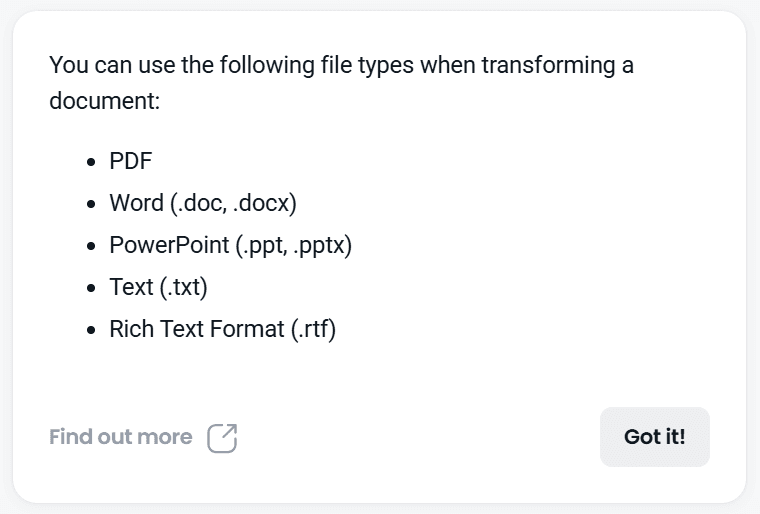
Most AI course creators accept PDFs, Word docs, presentations, and even plain text. Some also pull text from internal sites or shared docs and turn them into structured course materials.
This stage doesn’t demand perfection; it just needs something to start from. The AI training creator takes those inputs and begins shaping them into a course your team can actually use.
If you’re curious about how to turn PowerPoint slides into presentations, here’s a full guide: Convert PowerPoint slides into interactive E-learning courses.
Generation: AI structures your content
Once the inputs are in, the real lift begins.
The AI training creator reads your materials, detects patterns, and generates a clear course outline in just seconds.
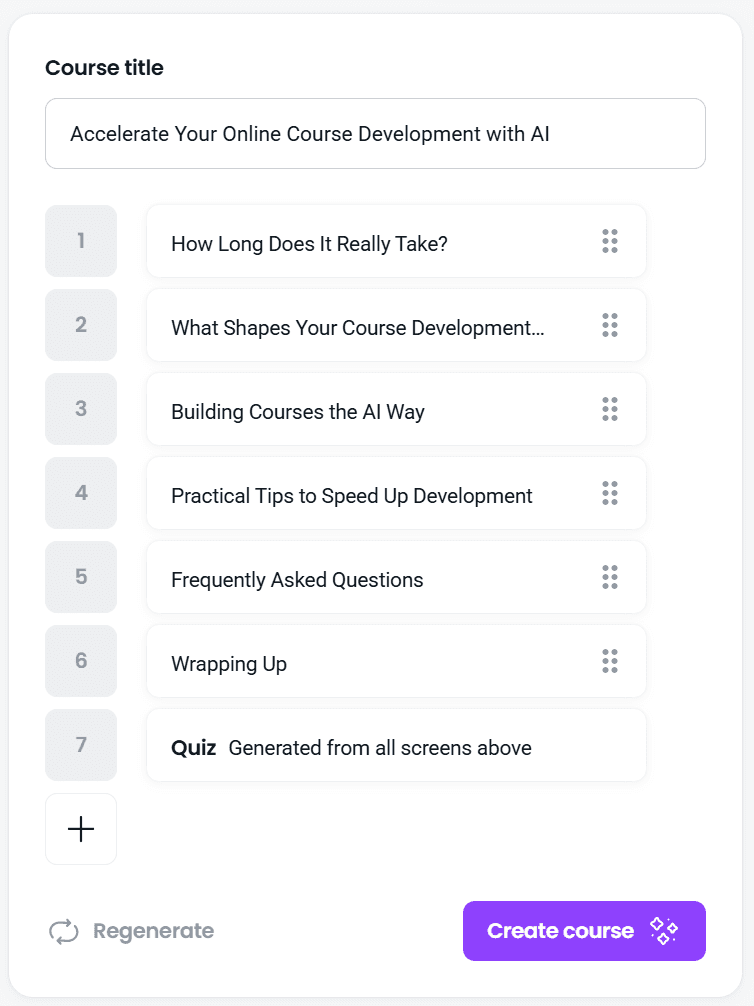
The tool breaks long documents into bite-sized lessons, adds headings, and organizes ideas into modules that make sense for your audience. You’ll often see suggested quizzes, visual layouts, and interactive elements appear automatically.
Good AI course generators don’t simply copy and paste your text.
They apply learning design like chunking, sequencing, and clarity so the draft feels like a real learning experience, not a wall of text.
Customization: Make it yours
Now you shape the draft into something that feels like it came from your team, not a machine.
The AI training creator gives you a structured starting point, but it's your voice, examples, and context that bring the course to life.
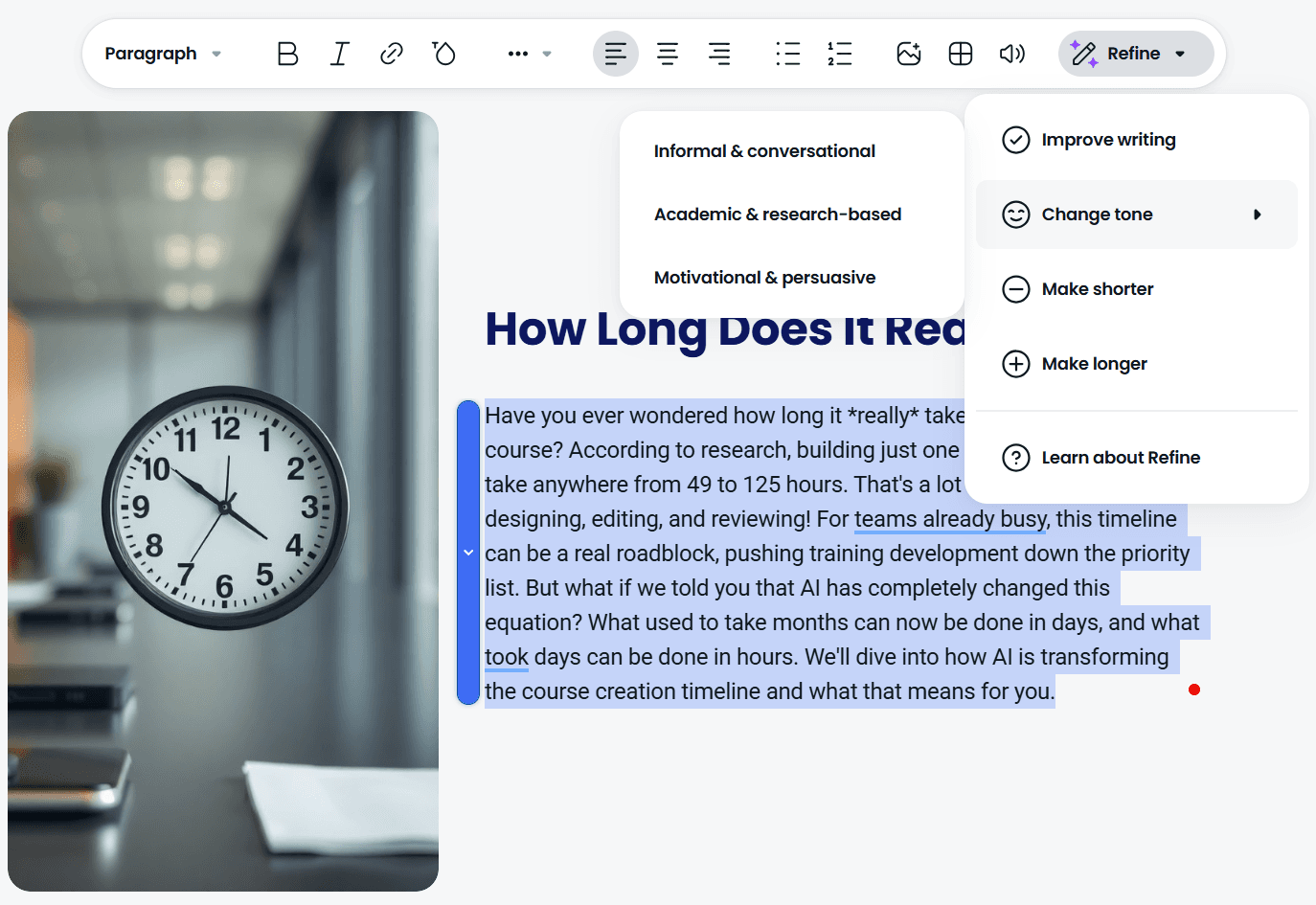
Adjust the tone. Add real stories from your team. Refine the course content to match your teaching style.
Reorder sections. Swap examples. Tweak the quizzes. Remove anything that doesn’t serve your learning objectives.
Most AI course creators use a simple, drag-and-drop builder, so updating modules, visuals, or text feels as familiar as editing a doc. The heavy lift is done; now you’re just polishing.
Output: Share interactive training
Once the course feels right, you publish it. Fast. The draft becomes a complete online course that your learners can follow from start to finish.
Most AI course creators let you share the final training in multiple ways.
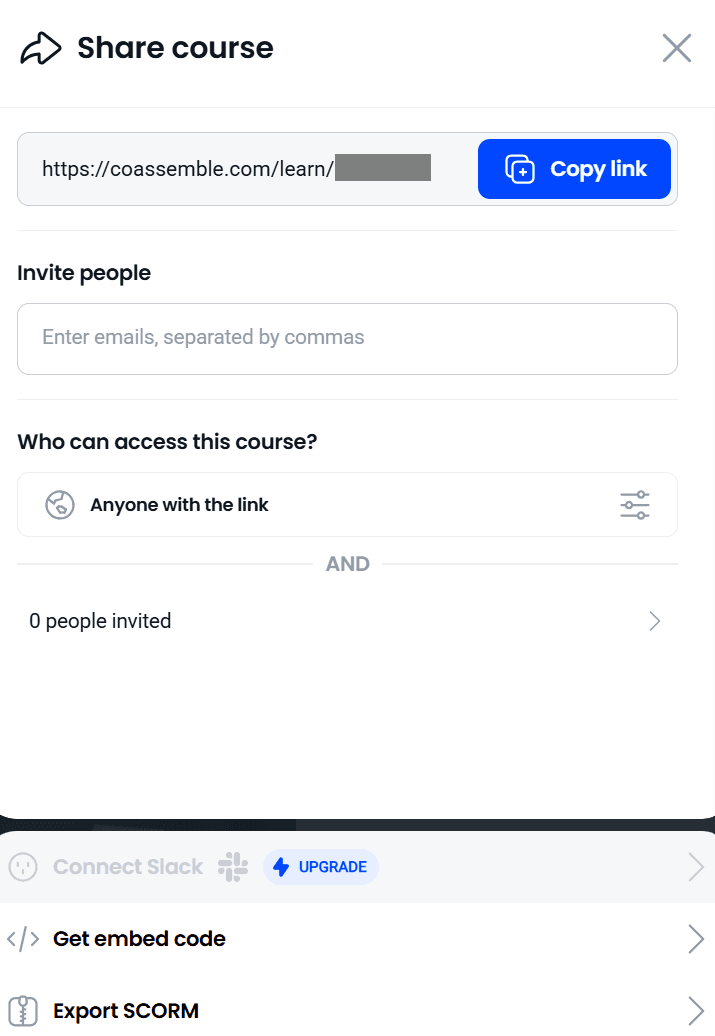
Drop a link. Embed it across your existing tools. Export to your LMS. Push it straight into Slack or Teams. Anywhere you can place a URL, your interactive courses can live.
This step turns still documents into something people can actually use.
Your team can track progress, check completion, and see who needs support. No more guessing if anyone opened that PDF.
With Coassemble’s AI Create, this whole flow becomes even simpler.
The editor is built for non-designers. If you can edit a Google Doc, you can customize your course and share it anywhere your team already works.
Key features to look for in an AI training creator
The right AI training creator should reduce effort, respect your existing materials, and help you build high-quality courses without adding another complex system to your stack.
Here’s what matters most when you’re choosing a platform.
Rapid content generation that actually saves time
You upload your course materials, and AI generates a complete course outline in just a few clicks.
The time savings are substantial.
A documented case study found that AI-assisted course creation reduced development time by 89%, with an entire course built in minutes instead of hours.
Instead of starting from a blank editor, you begin with a full draft you can refine. What once required multiple review cycles and long production windows becomes a single working session.
A two-week project becomes a same-day launch.
Your team moves from idea to online course without waiting on designers, rewriting slides, or rebuilding layouts by hand.
Content repurposing (your knowledge already exists)
An AI training creator takes the documents your team already relies on (PDFs, slide decks, SOPs, or older training) and turns them into structured online courses automatically.
You upload the source file, and AI generates a clear outline with lessons, visuals, and quizzes.
With Coassemble, that product launch deck your PM made becomes an interactive product training course, complete with quiz questions that reinforce feature knowledge.
Variety of content types (more than just text)
A strong AI training creator can produce text-based lessons, presentations, visual layouts, audio snippets, and built-in assessments all from the same source file.
Some tools lean toward video generation, while others focus on clean, interactive modules you can turn into anything from quick mini courses to deeper, structured full courses.
And when you need a quick walkthrough or demo, Coassemble makes it easy to record a Loom video right inside the editor. No switching tabs or extra tools. Just hit record, explain the process, and drop the video straight into your training.
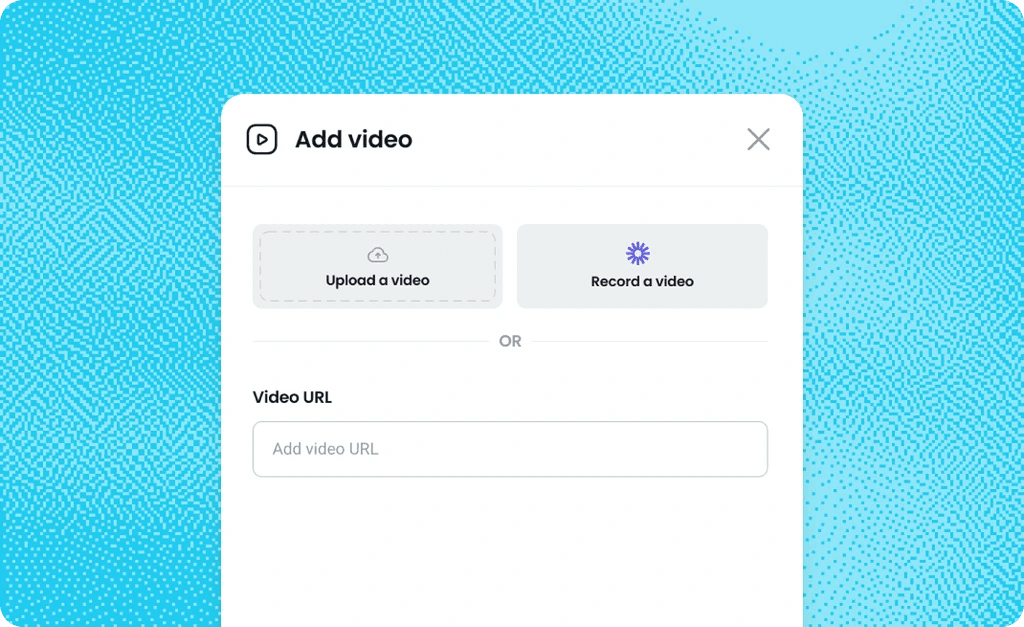
Mixing formats matters. It keeps people engaged without forcing your team to design every element manually. And for most internal training, document-based formats work best. They’re faster to update when your product shifts every week.
Interactive elements without the design work
A solid AI training creator adds interaction automatically. AI generates quizzes, knowledge checks, and simple scenario-based questions the moment you upload your materials.
Some platforms even include an AI assistant that supports learners in real time, answering quick questions as they move through the course.
And none of it feels heavy. Interactive doesn’t mean complicated; these elements come built into the platform, ready to use.
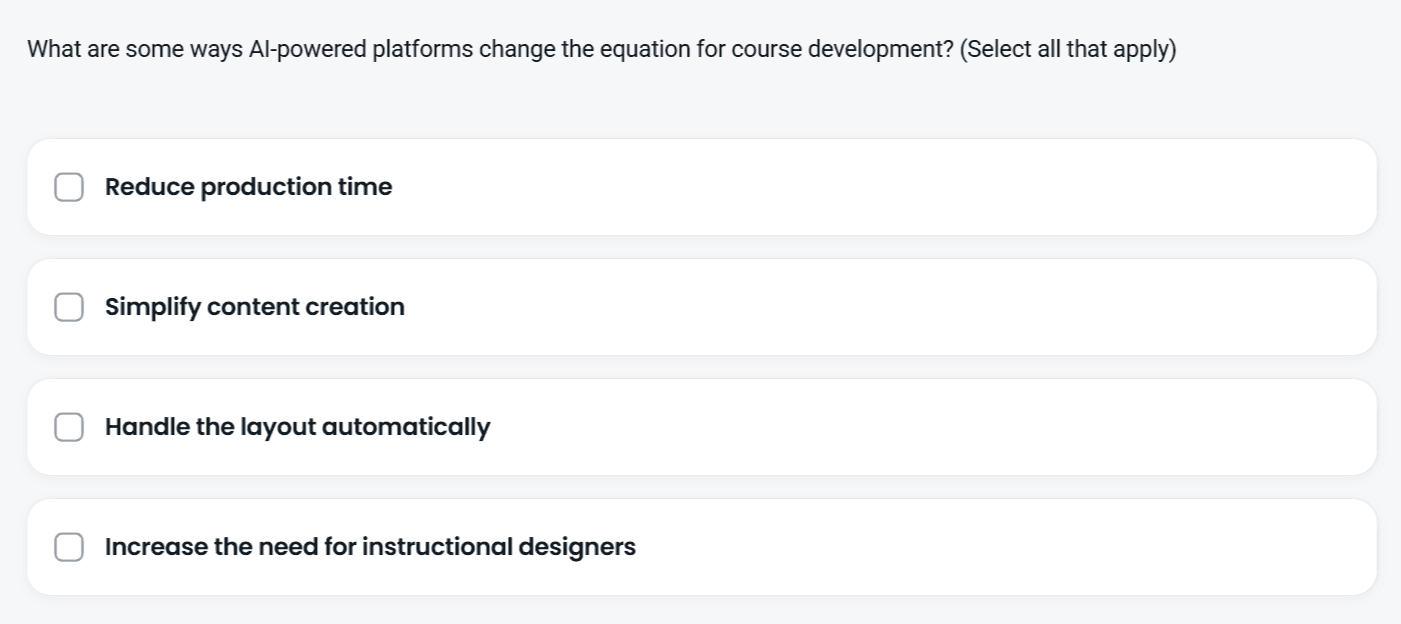
With Coassemble, quizzes are auto-generated straight from your content. Edit them if you want, or ship them as-is and keep the momentum going.
Time and cost savings (the real ROI)
The biggest shift happens here. A strong AI training creator compresses weeks of production into hours, helping your team move from idea to course without the usual delays.
You also avoid the hidden costs: no external designers, no video production, no specialist agencies charging thousands to rebuild slides you already have.
For example, a small content agency without an L&D team would normally spend $2,000-$5,000 per course outsourcing design and development. With Coassemble, they cut that to zero. Their HR manager now creates one mini course or even a full course every month as part of their normal workflow.
With free AI or low-cost plans, your course creation budget stretches further. You spend less on tools and more on improving the learning experience your learners actually need.
Full customization after AI generation
An AI training creator gives you the first draft, but you shape the final course.
AI suggests. You decide.
You can do the following:
- Adjust the tone to match how your team communicates
- Refine the language so it feels natural and clear
- Add team-specific scenarios and real examples
- Update outdated details or remove anything no longer relevant
- Reorder modules to improve flow
- Align the course with your brand: colors, voice, structure
This stage keeps your expertise front and center. The tool accelerates the work, but it never overrides your judgment. It’s a co-pilot that handles the heavy lift so you can focus on clarity, accuracy, and impact.
Choosing an AI training creator: a practical framework
Most tools look similar at first glance. The real difference shows up when your team tries to build and publish an actual course. A clear decision framework helps you pick a platform that supports your creation process instead of slowing it down.
Start with your pain points, not features
Before comparing buttons and menus, zoom in on what’s slowing you down today.
Common blockers include:
- Too many documents, not enough time to turn them into usable online courses
- No designers or instructional specialists available to rebuild slides or write scripts
- Training needs that change weekly, leaving no space for long production cycles
An effective AI training creator should remove these friction points immediately. If it can’t, it’s the wrong tool. No matter how many features it advertises.
Essential questions to ask
Choosing an AI training creator gets clearer when you ground it in one real scenario.
Let’s use a simple one: creating onboarding training for new hires.
Ask each question through that lens:
- Can it transform my existing documents? Your onboarding handbook, intro slides, and SOPs should turn into a structured online course automatically. With Coassemble, you upload them once and get a full outline with lessons and quizzes.
- Is it truly free or just a trial? You should be able to publish and deliver training without hitting a paywall. Coassemble lets you build and test a real course through a free sandbox. The goal here is seamless delivery.
- Can non-technical team members use it? HR should be able to update a policy section with zero design experience. Coassemble keeps the editor as simple as editing a doc.
- Where can I share the training? New hires should access onboarding wherever they already work: Slack, email, or your LMS. Coassemble supports all three. And more.
- Does it track completion? You need to know who finished day-one essentials. Coassemble gives you that visibility instantly.
One example. Clear answers.
A much simpler buying decision.
What about video-based AI trainers?
Video-focused tools have their place. They work well for polished, customer-facing content or branded explainers where visuals matter as much as the message.
Some AI course creators even auto-generate avatars, voiceovers, or scripted videos that look production-ready.
But for internal training, like onboarding, process updates, product changes, document-based creation usually wins. It’s faster to update, easier to maintain, and cheaper to scale when your team moves quickly. A policy change shouldn’t require re-recording an entire video.
Coassemble stays focused on what growing teams need: turning existing documents into clean, structured interactive courses you can update in seconds, record a quick Loom walkthrough when needed, and publish anywhere your team already works.
Wrapping Up
AI training creators are all about removing the friction that keeps your knowledge stuck in documents, decks, or archived threads. When AI generates structure in minutes, your team can focus on clarity, context, and the parts of training that actually move people forward.
The strongest platforms don’t force you into new workflows. They work with what you already have and turn them into online courses your learners can complete anywhere.
Coassemble makes this shift practical.
Upload a file. Get a full outline. Refine it your way. Publish it wherever it needs to live.
Your knowledge already exists.
Now you can help it move. Request a free Coassemble sandbox.
FAQs about AI training creators
What is an AI training creator?
An AI training creator is a tool that uses artificial intelligence to turn your existing documents, slides, or notes into structured online courses with lessons, quizzes, and clear learning objectives.
How does an AI training creator work?
You upload your materials, and AI generates a draft course – complete with an outline, modules, and interactive elements – which you can then refine and publish.
Can I create a course using AI for free?
Yes. Many platforms offer free AI features that let you create courses without upfront cost. Coassemble lets you build and test a real course through a free sandbox.
Do I need technical expertise to use an AI training creator?
No technical skills needed. Most tools use simple, user-friendly editors that let you customize text, visuals, or quizzes with ease.
What's the difference between an AI training creator and an AI course builder?
These terms are often used interchangeably, but “AI training creator” is more focused on workplace learning, while “AI course builder” can also refer to tools used for selling online courses or educational content.
Keep reading
What is the best embeddable training software for SaaS platforms?
Embeddable training software puts course creation, delivery, and tracking inside your product instead of a separate portal. Here's what to look for, and how the top SaaS options compare in 2026.
What is a learning infrastructure, and how is it changing?
Learning infrastructure is the systems that create, deliver, and track training. Here's what it includes, how it differs from an LMS or a learning ecosystem, and how embedded learning and AI agents are changing the model.
What training software has the best API and developer documentation?
A robust API means little if the docs are unclear or support-gated. Six practical checks for evaluating a training platform's API and developer documentation before a sales call.