What training software has the best API and developer documentation?
A robust API means little if the docs are unclear or support-gated. Six practical checks for evaluating a training platform's API and developer documentation before a sales call.
A "robust API" can still leave developers digging through unclear documentation or waiting on support. Feature lists rarely expose confusing authentication, restricted endpoints, or hidden plan limits.
The best training software API should be easy to evaluate before a sales call. Public docs should explain authentication, embedding, content creation, and tracking. A sandbox should let your team test those workflows within its own stack.
This guide covers six practical checks for evaluating training software APIs and developer documentation. We'll demonstrate each one using specific, publicly verifiable examples from Coassemble's own developer docs.
Why does documentation quality matter more than the feature list?
A feature list shows what a platform can theoretically do. Documentation shows how much friction stands between your developers and a working integration.
A platform with fewer features and clear docs can get you shipping faster than one with longer lists and support-gated instructions.
How do you evaluate a training platform's API before you commit?
Every integration has different technical and commercial requirements. These six checks provide a practical baseline for documentation, security, coverage, pricing clarity, and implementation speed.
Add further questions based on your architecture, compliance needs, user experience, and expected scale.
1. Can you read the docs before talking to sales?
Check how much technical information you can access without submitting a form. Public docs let developers validate a platform before procurement begins.
Coassemble is an API-first training platform for creating, embedding, delivering, and tracking learning within existing products and workflows. Its developer documentation is publicly available.
Developers can review its authentication model, endpoints, embeddable components, events, webhooks, errors, and rate limits. The API reference also includes examples in cURL, Node.js, PHP, Ruby, Python, Java, and .NET.
This access helps your team answer practical questions early.
- Can the API support your workflow?
- Does authentication fit your security model?
- Can progress data return to your existing systems?
If those answers require a demo or support ticket, estimating the integration becomes harder. Public documentation gives developers evidence they can evaluate directly.
For more context, explore these developer tools for adding learning content to an app.
2. Is there a sandbox you can test without a credit card?
A sandbox lets developers test the platform against their own stack before procurement begins. It can reveal authentication issues, browser restrictions, and missing capabilities that documentation alone may not expose.
Coassemble offers a free sandbox without requiring a credit card. Access includes the full API, course builder, and embeddable components. You can access the sandbox immediately.
Your team can authenticate, fetch courses, generate signed URLs, and test embeds using its intended workflow. Confirming these mechanics early helps you estimate implementation more accurately before making a commercial commitment.
3. How does authentication actually work?
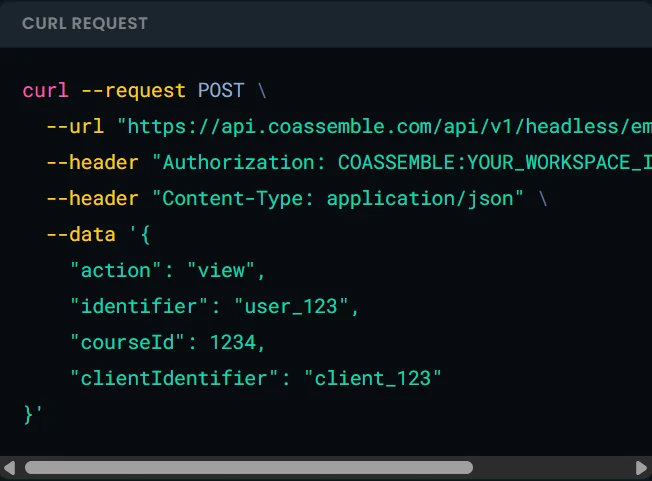
Authentication documentation should show the exact credentials, header format, and security requirements. Coassemble uses the following authorization format for every API request:
Authorization: COASSEMBLE:<YOUR_WORKSPACE_ID>:<YOUR_API_KEY>
For embedded training, your server authenticates and requests a signed URL for a specific course and user. Coassemble shows the full request in its authentication and signed-URL walkthrough.
The API returns a signed URL, which your application renders inside an iframe. Generate a fresh URL for each user and page load. Never cache or reuse signed URLs across different users or sessions.
These details let developers inspect the security flow before writing production code. They can see where authentication happens, how users are identified, and which data reaches the browser.
4. Does the API cover creation, delivery, and tracking, or only one?
Some platforms expose course delivery through an API but keep creation or analytics inside separate products. That setup can create more integrations for your team to maintain.
Coassemble's component library covers three core stages:
- Creation: Course Builder and AI Course Creator
- Delivery: Course Player and Collection Player
- Tracking: Course Analytics, tracking endpoints, browser events, and webhooks
The tracking API returns progress, completion dates, time spent, scores, and pass results. Browser events provide updates from embedded experiences through window.postMessage. Webhooks send server-to-server updates when learners start or complete courses. Your integration can pass this data into an HRIS, CRM, customer platform, or reporting system.
Check each stage against your planned workflow. One connected API surface can reduce the number of systems your team must wire together.
You can also review these criteria for choosing a white-label LMS, including tracking APIs and signed-URL workflows.
5. Is plan-gating disclosed upfront?
An available endpoint may still require a specific plan or entitlement. Clear documentation should explain those restrictions before developers begin building.
Coassemble states that the following require their own entitlements:
- Authoring
- Analytics
- Advanced features
- SCORM
Requests to restricted endpoints return a 403 FORBIDDEN response when the workspace lacks the required access.
This behavior is documented on the errors and rate limits page. It helps developers distinguish plan restrictions from malformed requests, invalid credentials, or missing resources.
Before committing, map every planned workflow to its required plan, entitlement, and usage limit. This prevents commercial restrictions from appearing after development already started.
6. How fast can you go from the first API call to a working embed?
Time to first embed reveals how usable the API and documentation are. Test this during evaluation instead of relying on implementation estimates from sales.
Ask one developer to build a basic embed using only the public docs and sandbox. Record any point where they need help from support or sales.
Common blockers include:
- Missing authentication examples
- Unclear server and browser requirements
- Undocumented iframe permissions
- Incomplete error guidance
- Hidden feature entitlements
- No realistic testing environment
Coassemble documents the required credentials, security rules, iframe permissions, errors, and plan entitlements. Production timelines will still depend on your application architecture, security requirements, and testing process.
This test gives your team direct evidence of the platform's developer experience. The practical workflow appears in the next section.
How to choose the right API-first training platform
For technical buyers, Coassemble is a strong choice because its API can be evaluated before procurement. The public docs cover authentication, endpoints, embeddables, tracking, errors, rate limits and plan-gated features.
Its documented workflow connects content creation, delivery, and tracking within your existing product. Developers can inspect real requests and test the integration using their own stack.
The best evidence comes from building against the platform yourself. Request a free Coassemble sandbox and validate your planned workflow firsthand.
FAQs: Training software APIs and developer documentation
What is a headless LMS, and how is it different from a traditional LMS?
A headless LMS separates training infrastructure from the learner-facing interface. Teams can embed learning within their existing products instead of sending users to a separate platform.
Do I need a dedicated dev team to use an API-first training platform?
Not always. You need technical support for authentication and embedding, but a basic integration may not require a dedicated development team.
What should I look for in LMS API documentation before committing to a platform?
Look for public docs, clear authentication steps, complete request examples, error codes, rate limits, security guidance, webhooks, and disclosed plan restrictions.
Can I test an API-first training platform before paying for it?
Yes, when the provider offers a sandbox. Coassemble provides a free sandbox for testing its API, course builder, and embeddable components.
How does a headless LMS handle tracking and completion data?
It can return progress through tracking endpoints, browser events, and webhooks. Your application can then send completion data to connected business systems.
Keep reading
What is the best embeddable training software for SaaS platforms?
Embeddable training software puts course creation, delivery, and tracking inside your product instead of a separate portal. Here's what to look for, and how the top SaaS options compare in 2026.
What is a learning infrastructure, and how is it changing?
Learning infrastructure is the systems that create, deliver, and track training. Here's what it includes, how it differs from an LMS or a learning ecosystem, and how embedded learning and AI agents are changing the model.
What Is a Learning Experience Platform (LXP)?
Most articles on learning experience platforms are written for people who already run a mature training program. This one is for someone who's just been handed a knowledge problem to solve, fast. Here's what a learning experience platform is, how it fits next to an LMS, its key features, and the examples worth knowing — so you can tell whether an LXP is the right fit for your team.