Migrate from other tools
How to move training into Coassemble from an LMS, another authoring tool, or older legacy files, and when to host a package, convert it, or rebuild the content.
You can move training into Coassemble whether it lives in an LMS, another authoring tool, or older legacy files. There are three routes in, and most libraries end up using a mix of them:
- Host it. Upload an existing SCORM package and run it exactly as it was authored. Nothing is rebuilt, your original design and interactions are preserved, and you get attempt-level reporting in Coassemble. This route is open to every workspace.
- Convert it. Upload a SCORM package and have it rebuilt as a fully editable Coassemble course made of blocks, so you can update, translate and reuse the content afterwards. This route is open to every workspace.
- Rebuild it. Where you have source material but no package, give the agent your documents, decks or scripts and it builds a course from them.
Which route you pick comes down to whether the content needs to change.
Which route should I use?
| What you have | What you want | Route |
|---|---|---|
| A SCORM package of approved content that rarely changes | It to keep running, exactly as it is | Host it |
| A SCORM package you need to edit, translate or reuse | Editable content in Coassemble | Convert it |
| Source documents, decks or scripts, no package | A new course built from that material | Rebuild with the agent |
| A large catalogue to move in one controlled run | A repeatable pipeline | The API |
Hosting is the only route that gives you an exact port. Converting and rebuilding both produce a Coassemble course, which means the content carries across but the original styling does not.
Leaving another authoring tool
If your training is built in another authoring tool, export it as a SCORM package from that tool first. That single file is enough to bring the course in, and you don't need to go hunting for the original project files.
- Export a SCORM package from your existing tool.
- Decide host or convert. Host it to keep it exactly as built. Convert it if you need the content editable in Coassemble.
- To host: click New course, then Upload SCORM package.
- To convert: click Create with agent and upload the package there. Articulate Rise, Articulate Storyline, Adobe Captivate and iSpring are recognised specifically and convert most reliably. Packages from other tools are read generically, so expect less of the original structure to survive.
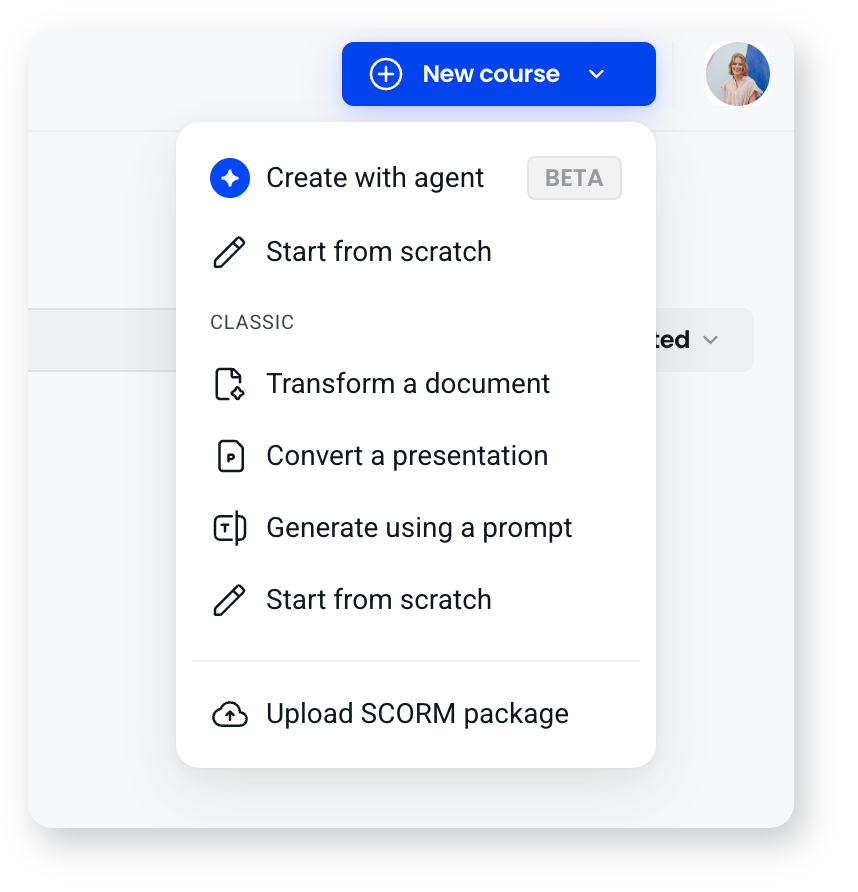
If you have no package and no export, rebuild from whatever source material you do have. Give the agent your documents, decks or scripts and it builds a course you can refine.
Moving from an LMS to Coassemble Embed and your own platform
If you currently author and deliver in an LMS but want training to live inside your own product:
- Bring the content into Coassemble by hosting your existing SCORM packages, converting them into editable courses, or rebuilding from source material where no package exists.
- Deliver through Embed instead of the LMS: use Coassemble's embeddable components and API to surface courses, collections, and analytics natively inside your product.
- Send results where you need them: tracking data and course events are available through the API and webhooks, so completions can flow into your own systems rather than staying in the LMS.
- Transition gradually. SCORM works in both directions during a changeover. You can host the LMS's existing packages in Coassemble as you move content across, and you can still export Coassemble courses as SCORM to run in the old LMS, so nothing goes dark while you move delivery across.
Moving legacy training in
For older training, the package itself is usually enough to work with.
Legacy SCORM packages. Host them to keep them running as they are, or convert them into editable courses if the content is due a refresh. You do not need the original source files for either.
Slide decks, PDFs and documents. Give them to the agent and it builds an interactive, mobile-responsive course from them.
Either way, use the move to clean up: refresh out-of-date content, drop anything no longer needed, and standardise the look with a theme. Content you host keeps its original look, so if visual consistency across your library matters, converting is the route that brings it onto your theme.
Automate migration at scale with the API
For a large catalogue, you don't have to work course by course in the builder. If you build with the Coassemble API, you can turn migration into a repeatable pipeline:
- Generate programmatically: use the Generate API to create courses, screens, and quizzes directly from your source content (prompts, documents, or presentations), at volume.
- Assemble and organise in bulk: use the content APIs to create courses and screens and group them into collections, so an entire library can be structured by script rather than by hand.
- Cut over cleanly: pull tracking and usage data back through the API as you retire the old system.
This is the difference between migrating ten courses manually and moving a few hundred in a controlled, automated run.
What carries over
If you host the package, everything does. The design, the interactions, the wording, exactly as your authoring tool built them. This is the route to use when the content has already been approved and has to survive intact.
If you convert the package, the content carries across and the styling does not:
- Text content: headings, paragraphs, and lists come across directly.
- Images and media: images and galleries come across. YouTube and Vimeo links copy across cleanly.
- Interactions: accordions, flashcards, process steps, tabs and timelines are mapped onto the closest Coassemble block, so they stay interactive rather than flattening into paragraphs. Order is preserved. Labelled graphics from Articulate Rise become Hotspot blocks, with the image and markers in place, when you convert with Verbatim or Structured.
- Quiz questions: knowledge checks and quiz slides come across as real question blocks with their answer options and correct answers intact.
- Course structure: your module and lesson organisation is recreated, even where individual screen types differ.
What conversion does not reproduce is hotspot interactions from tools other than Rise (the text comes across, the clickable image does not), the original visual design (your course takes your Coassemble theme), and tool-specific behaviour like Storyline branching, triggers and animation. Anything that could not be converted is listed for you afterwards rather than quietly dropped. If those things matter, host the package instead.
A migration approach that works
For anything beyond a course or two:
- Audit first. List your existing courses, rank them by use and importance, and don't migrate low-value or unused content.
- Decide port or redesign, per course. Hosting gives you an exact port with no rework. Converting and rebuilding are a redesign, and are the right call when content is out of date anyway.
- Start with one course. Take it end to end to validate the process, set a visual style, and estimate effort.
- Use the agent and the API to accelerate. Convert packages, rebuild from source with the agent, or automate with the API for larger libraries.
- Phase the rollout. Move high-priority courses first, retire the rest, and build in review time for anything you convert or rebuild.
Frequently asked questions
Can I import my existing course files directly?
SCORM packages, yes. Upload one and either host it as it is or convert it into an editable Coassemble course. What you cannot import is another tool's proprietary project file, so export a SCORM package from that tool first.
Do I need the original source documents to move a course in?
No. If you have a SCORM package, that is enough to host or convert. Source documents are only needed when there is no package to work from and the course has to be rebuilt.
Can I automate a large migration?
Yes. With the Coassemble API you can generate and assemble courses programmatically, so a big catalogue can be rebuilt as a scripted pipeline rather than course by course.
Can I keep using my LMS during the move?
Yes, and it works in both directions. You can export Coassemble courses as SCORM to run in your existing LMS, and you can host that LMS's existing SCORM packages in Coassemble as you move content across.
Will my original SCORM files still work?
Yes. Hosting and converting both read a copy of the package. Nothing changes about the file you uploaded, so it keeps working wherever it is running today.