Workspace tour
Where to find your courses, create new content, view collections, and reach your account settings and the Developer console.
Your workspace is where you create, organise, and manage everything you build. When you log in, you usually land on the Courses dashboard (people with the Developer role land in the Developer console), with your courses in the main area and a navigation menu on the left to move between your courses, collections, and settings.
Your Courses dashboard
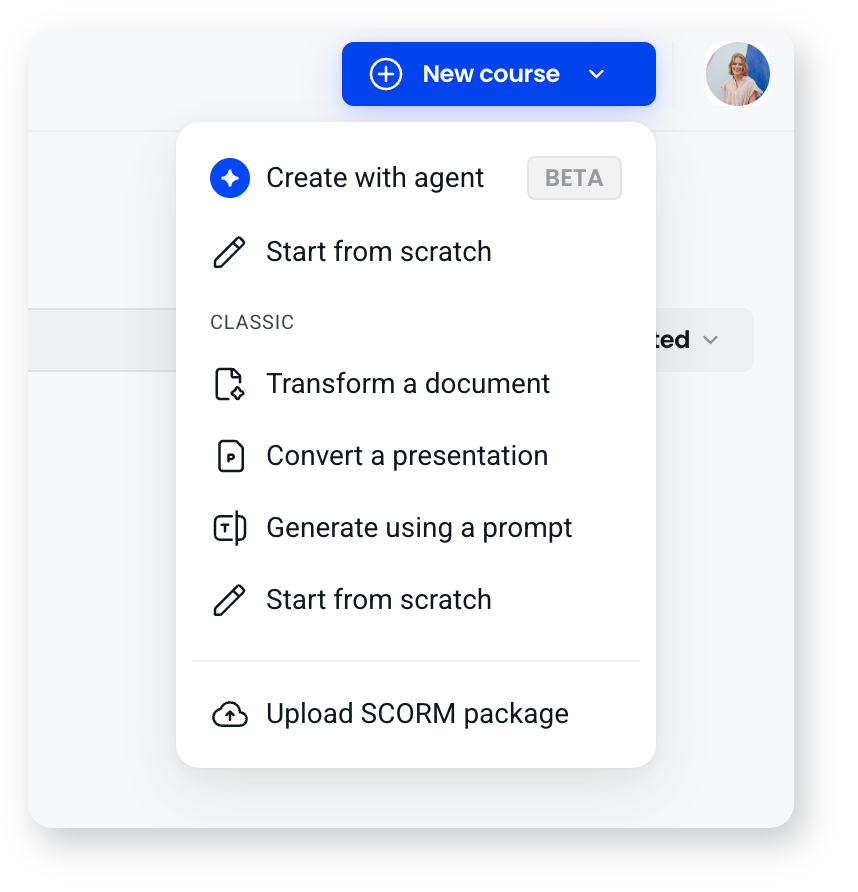
This is your home base. It shows all your courses as cards, and it's where you start anything new. Select New course and pick how you want to start:
- Create with agent: describe what you want or upload your material, and the AI agent builds the course with you.
- Start from scratch: build it yourself, choosing a layout for each screen and arranging blocks on it.
- Upload SCORM package: bring in an existing SCORM course.
- Classic: the earlier creation methods, which build in the Classic builder. Transform a document, convert a presentation, generate from a prompt, or start from scratch.
Moving between courses and collections
Use the left-hand navigation to switch views:
- Courses shows your full course library.
- Collections shows your courses grouped into programs or learning paths. Click a collection to see the courses inside it, and use the back arrow to return to the list.
If you can't see the left-hand menu, click the menu (hamburger) icon in the top-left corner to open it.
Organising with folders
If your workspace uses folders, you can group related courses together and click into a folder to see what's inside, which keeps a large library easy to navigate.
Working with a course
Each course appears as a card. Select Insights on a card to see how the course is performing, or click its three-dot menu for actions such as Preview, Duplicate and Delete.
Your profile and account settings
Click your profile icon in the top navigation to edit your profile or log out. Settings holds your workspace details, notifications, members, SCORM allowlist, connections, plans and billing, usage limits and MCP connections. API keys, webhooks, your API request log and per-client usage are in the Developer console, which you open by selecting Developer in the navigation. Only people with the Owner, Admin or Developer role see it.
Frequently asked questions
Where do I create a new course?
From the Courses dashboard, select New course and choose how to start: with the agent, from scratch, from a SCORM package, or with one of the Classic options.
How do I see how a course is performing?
Select Insights on the course card.
Where do I find API keys and webhooks?
In the Developer console. Select Developer in the navigation, then open the API keys or Webhooks tab. Only people with the Owner, Admin or Developer role see it.
Why can't I see the navigation menu?
Click the menu (hamburger) icon in the top-left corner to open the left-hand navigation.