Create options compared
The ways to create a Coassemble course, and how to pick the right one for what you're starting with.
You can build a course by talking to the AI agent (with files, a SCORM package, or just a brief), or build it screen by screen yourself. The right one depends on what you're starting with and how much you want the agent to reshape it.
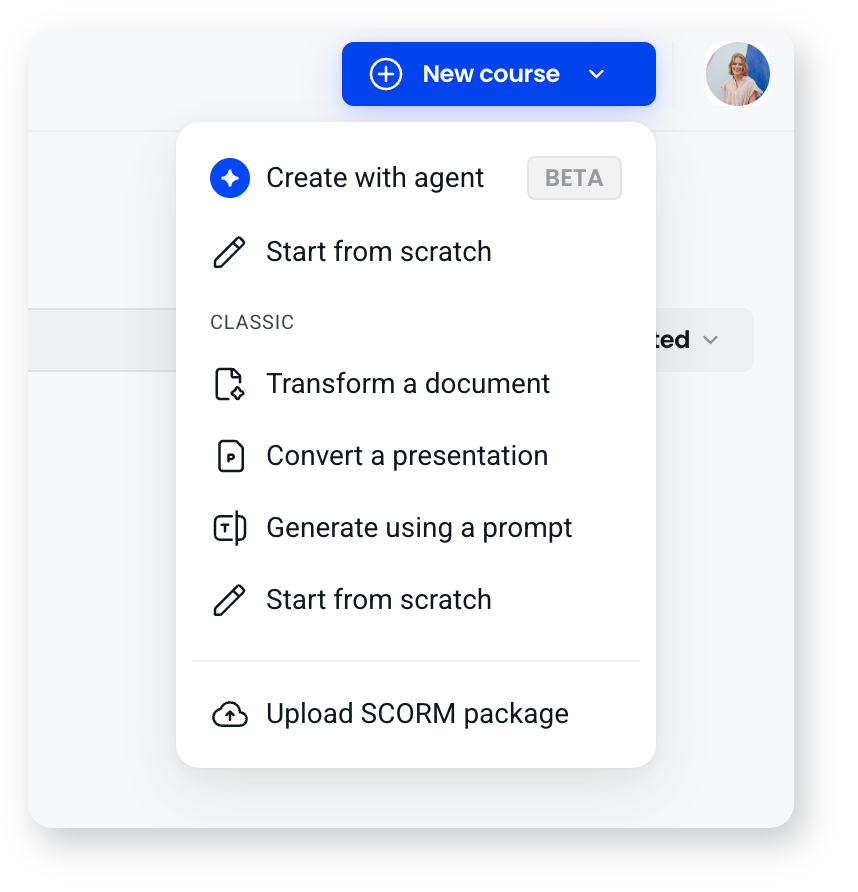
| Method | What it does | Best when |
|---|---|---|
| Build with the agent | You upload what you have, or describe what you want, and the agent asks a few questions and builds a structured course with sections | You have source material, or just an idea, and want a complete first draft to work from |
| Convert a SCORM package | Turns a package from Articulate Rise or Storyline, Adobe Captivate or iSpring into a fully editable Coassemble course | You have existing courses in another authoring tool and want to keep working on them in Coassemble |
| Start from scratch | You build the course screen by screen, choosing a layout for each one | You have a specific structure in mind, or you're adding to something small |
| Transform a document (Classic) | The Classic builder summarises and reformats a document into screens | You're working in the Classic builder |
| Convert a presentation (Classic) | The Classic builder brings your slides across word for word | You're working in the Classic builder and your wording must stay intact |
Choosing how closely to follow your source
When you build with the agent from a single document or a SCORM package, it asks how faithful to be:
- Verbatim: keeps your wording exactly as written, for policies, compliance and approved content.
- Structured: reorganises your material into a clear learning flow, keeping the content.
- Adaptive: builds the course around your learning outcomes, using your material as supporting content.
That choice, rather than which upload button you pressed, is what decides how much your original survives.
How to choose
- Have a document, deck or brief? Build with the agent.
- Have a Rise, Storyline, Captivate or iSpring package? Convert the SCORM package.
- Need your exact approved wording? Build with the agent and choose Verbatim.
- Want to craft it yourself? Start from scratch.
Whichever you pick, you can keep refining afterwards, either by asking the agent for changes or by editing screens directly. Most people mix methods across a course.
Frequently asked questions
Can I keep my content word for word?
Yes. Choose Verbatim when the agent asks how closely to follow your source.
Can I switch methods or combine them?
Yes. You can generate or import a course and then keep editing by hand, and build different parts in different ways. The methods are starting points, not locked paths.
Do I need a file to create a course?
No. You can describe what you want in a brief and the agent builds from that, or start from scratch with no file at all.